
Asus Chromebook C523N Back Cover Replacement

Aaron Hogan and 5 other contributors
Last updated on Apr 9, 2020
Views: 3.8K
View statistics:
- Past 24 Hours:
- 2
- Past 7 Days:
- 21
- Past 30 Days:
- 70
- All Time:
- 3,753
Comments: 0
No one has left comments on this guide. Will you be first?
Go to guide commentsCompleted: 3 4
3 people have marked this guide "completed." Will you be next?
4 people have marked this guide "completed." Including you — great job!
Favorites: 0 1
No one has favorited (and subscribed to) this guide. Will you be the first?
1 person has favorited (and subscribed to) this guide — and that's you!
Introduction
Go to step 1 ↓This repair guide is for the back cover of your Asus Chromebook C523N. This repair or removal may be necessary for access to the hardware of the laptop, the battery, or to replace a damaged back cover. You might find yourself needing to repair inner parts of the computer or replace a cracked, scratched, or ill-fitting back cover.
This guide does not require any advanced knowledge or skills for computer repair. To complete this guide you will need to use a screwdriver, iFixit tools, and Spudger.
Prior to starting ensure the computer is unplugged from its charger and you have an understanding of the tools being used.
What you need
Tools
-
-
Spudger4.9


-
-
-
Remove the four 0.5mm JIS #00 screws from the bottom edge of the Chromebook and one in the center.
-
Remove the six 1.7mm JIS #00 screws from the sides and top edge of the Chromebook.
 Ask FixBot
-
-
-
-
Using a spudger, lift the top left base pad and remove it to reveal a final screw underneath.
-
Remove the one 0.5mm JIS #00 screw underneath the base pad.
-
-
-
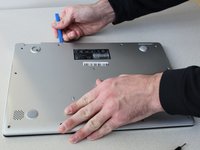
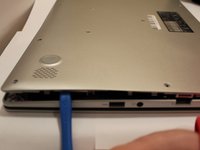
Use an opening tool to gently pry the base enclosure up and remove from the laptop.
-
-


To reassemble your device, follow these instructions in reverse order.
Cancel: I did not complete this guide.
3 other people completed this guide.

Team

Grand Valley State University, Team S4-G2, DeVasto Fall 2019 Member of Grand Valley State University, Team S4-G2, DeVasto Fall 2019
GVSU-DEVASTO-F19S4G2
4 Members
72 Guides authored
