Introduction
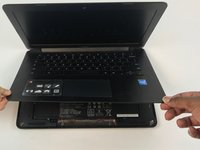
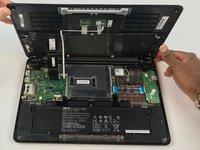
The present repair guide provides a step-by-step procedure on how to remove the back casing on your Chromebook. Be careful when prying off case if it does not budge be sure all screws are removed as to a void breaking the case.
What you need
-
-
-
Remove the three 6.0 mm Philips screws from the center of the case with the #2 screwdriver bit.
-
Remove the eight 9.0 mm Philips screws along the perimeter of the case with the #2 screwdriver bit.
-
-
-
-
Lift the keyboard panel away from the components at its hinges, which are located at the back of the laptop.
-

 Ask FixBot


To reassemble your device, follow these instructions in reverse order.

Team

USF Tampa, Team S4-G3, Eyestone Fall 2017 Member of USF Tampa, Team S4-G3, Eyestone Fall 2017
USFT-EYESTONE-F17S4G3
3 Members
72 Guides authored
