Free Shipping on Domestic Orders $75+

Astro Mixamp USB Port Replacement

What you need

    1. Astro Mixamp USB Port Replacement, Panel Dial: step 1, image 1 of 2 Astro Mixamp USB Port Replacement, Panel Dial: step 1, image 2 of 2
      • Grip the dial tightly and pull straight off the device.

      • Repeat for the second dial

      Ask FixBot

      Add Comment

    2. Astro Mixamp USB Port Replacement: step 2, image 1 of 2 Astro Mixamp USB Port Replacement: step 2, image 2 of 2
      Tool used on this step:
      Tweezers
      $4.99
      Buy
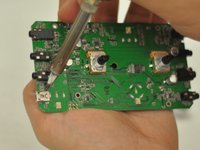
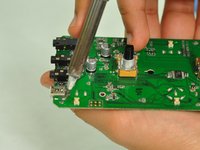
      • Using tweezers, remove the spacer nuts and washers from each dial post.

      Ask FixBot

      Add Comment

    1. Astro Mixamp USB Port Replacement, Outer Casing: step 3, image 1 of 2 Astro Mixamp USB Port Replacement, Outer Casing: step 3, image 2 of 2
      • Before opening your device, ensure the device is not on or connected to the charging cable.

      • Insert a plastic opening tool into the seam between the rubber foot and plastic casing.

      • Pull the rubber foot free of the plastic casing.

      Ask FixBot

      Add Comment

    2. Astro Mixamp USB Port Replacement: step 4, image 1 of 1
      • Use a screwdriver to remove the screw from the rear casing.

      Ask FixBot

      Add Comment

    3. Astro Mixamp USB Port Replacement: step 5, image 1 of 1
      • Gently lift the rear casing from the device.

      Ask FixBot

      Add Comment

    1. Astro Mixamp USB Port Replacement, Motherboard: step 6, image 1 of 3 Astro Mixamp USB Port Replacement, Motherboard: step 6, image 2 of 3 Astro Mixamp USB Port Replacement, Motherboard: step 6, image 3 of 3
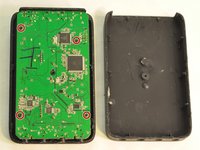
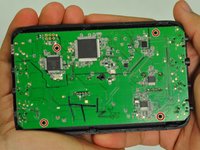
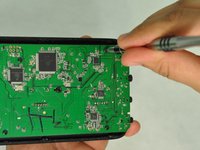
      • Remove the four screws that hold the motherboard in place.

      • Only touch the edges of the motherboard. Touching the surface can damage the motherboard.

      Ask FixBot

      Add Comment

    2. Astro Mixamp USB Port Replacement: step 7, image 1 of 1
      • Gently pull the motherboard from the front cover.

      Ask FixBot

      Add Comment

    1. Astro Mixamp USB Port Replacement, USB Port: step 8, image 1 of 3 Astro Mixamp USB Port Replacement, USB Port: step 8, image 2 of 3 Astro Mixamp USB Port Replacement, USB Port: step 8, image 3 of 3
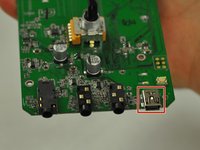
      • Press the tip of a hot soldering iron to the USB connection to melt the solder.

      • Use a nylon spudger to lift the USB from the solder.

      • Repeat for each of the four USB connections.

      • For more help on soldering, refer to this guide: How To Solder and Desolder Connections

      Ask FixBot

      Add Comment

Conclusion

To reassemble your device, follow these instructions in reverse order.

Cancel: I did not complete this guide.

2 other people completed this guide.

Hope Burns

Member since: 10/29/16

769 Reputation

5 Guides authored

4 Guide Comments

What port is used as a replacement?

jonescoleman1738 - Reply Share

Did you ever identify an appropriate replacement port?

Lepec - Reply Share

something was broken out of the port of the USB connection

MoreZemtor - Reply Share

Will this method work with the 2015 tr mixamp?

jeffreyalvarez9 - Reply Share

Add Comment

View Statistics:

Past 24 Hours: 1

Past 7 Days: 6

Past 30 Days: 43

All Time: 8,872