Free Shipping on Domestic Orders $75+

Astro A50 2016 Headset Motherboard Replacement

What you need

  1. Astro A50 2016 Headset Motherboard Replacement, Headset Speakers: step 1, image 1 of 2 Astro A50 2016 Headset Motherboard Replacement, Headset Speakers: step 1, image 2 of 2
    • Remove the magnetic ear pads by gently pulling them away from the headset. Be careful not to remove the left earpad, which houses the microphone, and ensure you're only removing the right earpad.

    Ask FixBot

    Add Comment

  2. Astro A50 2016 Headset Motherboard Replacement: step 2, image 1 of 1
    • Squeeze the plastic opening tool between the black plastic and foam pad on non mic side and then pry upwards to remove the felt pads covering the speaker.

    Ask FixBot

    Add Comment

  3. Astro A50 2016 Headset Motherboard Replacement: step 3, image 1 of 1
    • Remove the four 6mm Phillips 1 screws.

    Ask FixBot

    Add Comment

  4. Astro A50 2016 Headset Motherboard Replacement: step 4, image 1 of 1
    • Lift the speaker module up off the device.

    Ask FixBot

    Add Comment

  5. Astro A50 2016 Headset Motherboard Replacement, Headset Motherboard: step 5, image 1 of 1
    • Remove the four 6mm Phillips 1 screws.

    Ask FixBot

    Add Comment

  6. Astro A50 2016 Headset Motherboard Replacement: step 6, image 1 of 2 Astro A50 2016 Headset Motherboard Replacement: step 6, image 2 of 2
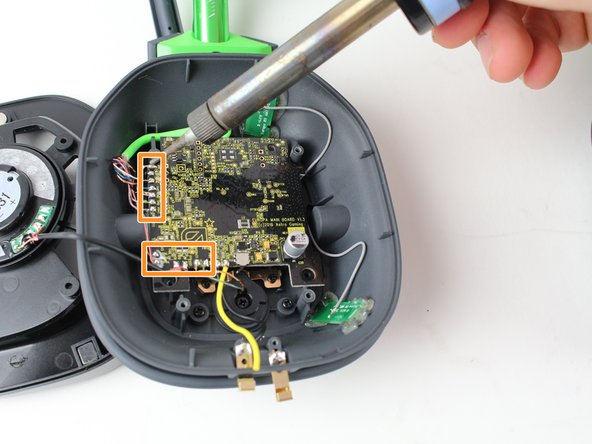
    • Use a soldering iron to desolder the black and yellow wires from the two metal plates near the bottom of the device.

    • Use a soldering iron to desolder the 13 wires in rows along the left and bottom sides of the headset motherboard.

    • How To Solder and Desolder Connections

    Ask FixBot

    Add Comment

  7. Astro A50 2016 Headset Motherboard Replacement: step 7, image 1 of 1
    • Use the plastic opening tool to pry off the black tape covering the gray wires

    Ask FixBot

    Add Comment

  8. Astro A50 2016 Headset Motherboard Replacement: step 8, image 1 of 1
    • Lift the motherboard out of the headset and gently disconnect the gray wires from the motherboard.

    Ask FixBot

    Add Comment

Conclusion

To reassemble your device, follow these instructions in reverse order.

Cancel: I did not complete this guide.

3 other people completed this guide.

Brian Menard

Member since: 10/01/17

306 Reputation

1 Guide authored

Team

Cal Poly, Team S15-G1, Livingston Fall 2017 Member of Cal Poly, Team S15-G1, Livingston Fall 2017

CPSU-LIVINGSTON-F17S15G1

3 Members

13 Guides authored

2 Guide Comments

Any chance I could get the E250336. USB board part from you guys? I need one.

Theron Miller - Reply Share

I am having a very tough time finding this Part online. Thanks!

Theron Miller - Reply Share

Add Comment

View Statistics:

Past 24 Hours: 0

Past 7 Days: 13

Past 30 Days: 33

All Time: 4,878