
Astro A20 Microphone Replacement

Jasmine Yarbrough and 2 other contributors
Last updated on May 5, 2021
Views: 16K
View statistics:
- Past 24 Hours:
- 4
- Past 7 Days:
- 40
- Past 30 Days:
- 164
- All Time:
- 16,042
Comments: 9
4 comments on steps, 5 guide comments.
Go to guide commentsCompleted: 9 10
9 people have marked this guide "completed." Will you be next?
10 people have marked this guide "completed." Including you — great job!
Favorites: 0 1
No one has favorited (and subscribed to) this guide. Will you be the first?
1 person has favorited (and subscribed to) this guide — and that's you!
Needs More Images
A few more images would make this guide's procedures crystal clear.
Missing Steps
Oops! This guide is currently missing one or more important steps.
Introduction
Go to step 1 ↓The Astro A20 microphone replacement guide shows the steps of replacing a microphone with the use of a 60 mm extension, Phillips #1 screwdriver, and a new microphone.
What you need
Tools
-
Spudger4.9


-
-
-
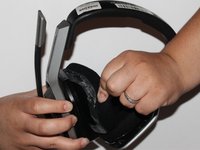
Place one hand on the hard side of the headset ear portion and on the cushion.
-
Lift the small portion on the edge of the cushion.
 Ask FixBot
-
-
-
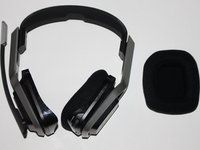
Slide the metal spudger underneath the lift part of the ear cushion.
-
Pull the ear cushion while wedging the spudge around the edge of the ear cushion.
-
-
-
-
-
-
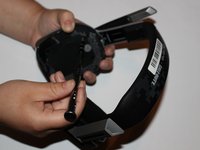
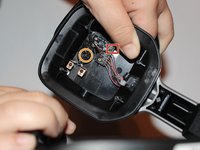
Lift the speaker area.
-
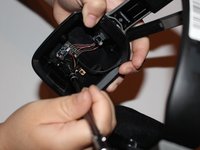
Disconnect the wires that connect the microphone.
-
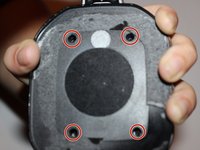
Remove the 7mm screw with a Phillips #1 screwdriver.
-






To reassemble your device, follow these instructions in reverse order.
Cancel: I did not complete this guide.
9 other people completed this guide.

Team

University of Alabama, Team S1-G2, Bedsole Fall 2018 Member of University of Alabama, Team S1-G2, Bedsole Fall 2018
UA-BEDSOLE-F18S1G2
4 Members
60 Guides authored
5 Guide Comments
worked for me….thanks
this really worked! There was no need to get a replacement mic since it was just a torn cable not making good contact. Thanks a lot!
