
Astro A10 Gen2 Tighten Microphone

C.J. Tran and one other contributor
Last updated on Sep 2, 2026
Views: 328
View statistics:
- Past 24 Hours:
- 8
- Past 7 Days:
- 30
- Past 30 Days:
- 98
- All Time:
- 328
Comments: 4
4 comments on steps.
Completed: 0 1
No one has marked this guide "completed." Will you be the first?
1 person has marked this guide "completed." It's you — great job!
Favorites: 0 1
No one has favorited (and subscribed to) this guide. Will you be the first?
1 person has favorited (and subscribed to) this guide — and that's you!
Needs More Images
A few more images would make this guide's procedures crystal clear.
Missing Steps
Oops! This guide is currently missing one or more important steps.
Community-Contributed Guide
An awesome member of our community made this guide. It was not created by iFixit staff.
Introduction
Go to step 1 ↓Prerequisite guide not required nor the exact model but it was helpful inspiration for mine.
What you need
Parts
Tools


-
-
-
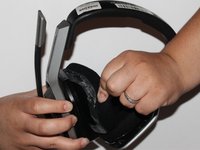
Place one hand on the hard side of the headset ear portion and on the cushion.
-
Lift the small portion on the edge of the cushion.
 Ask FixBot
-
-
-
Slide the metal spudger underneath the lift part of the ear cushion.
-
Pull the ear cushion while wedging the spudge around the edge of the ear cushion.
-
-
-
-
-
Lift the speaker area.
-
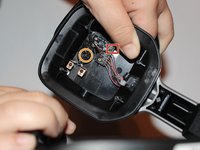
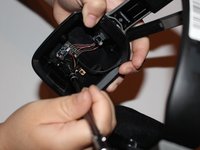
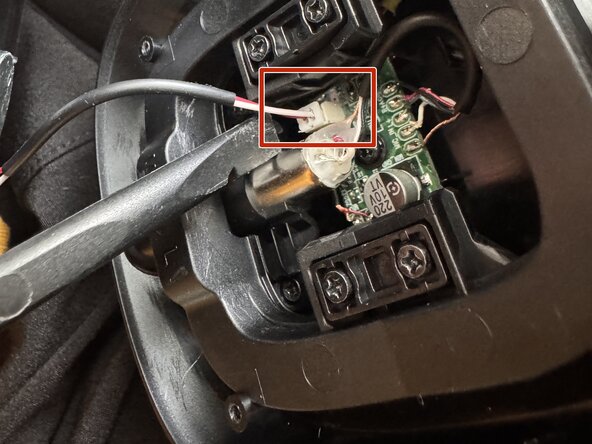
Disconnect the wires that connect the microphone.
-
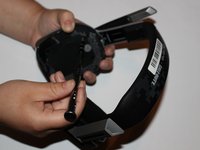
Remove the 7mm screw with a Phillips #1 screwdriver.
-
-
-
-
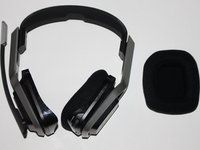
Gently lift the ear cup around the edges of the headphone, starting with one point and making your way around until all the clear edges of the cushion are pulled out.
-
If you're having difficulty (taking it off or putting it back together), try pinching around the seams of the fabric and the plastic rubber.
-
-
-
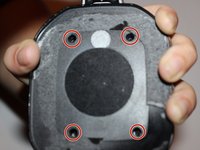
Using the Torx screwdriver, remove the 4 screws holding the housing together.
-
-
-
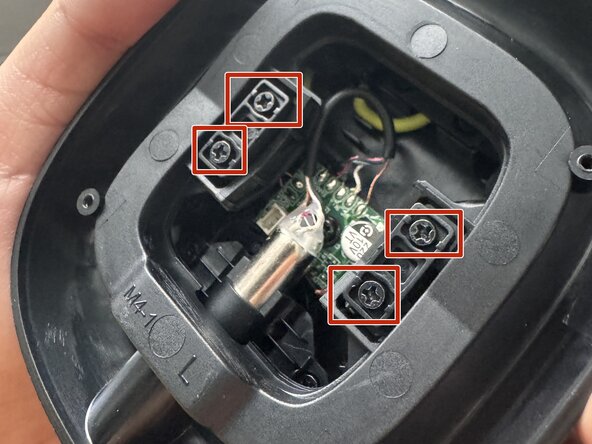
Using the Phillips screwdriver, unscrew the 4 screws holding the plastic piece and the frame together.
-
-
-
-
Using a plastic pry tool, disconnect the battery (it may take some wiggling from each side).
-
Be careful with hitting any other wires or pieces.
-
-
-
Take care to not lose the plastic pieces the screws were attached to, as well as take note of the direction they were facing.
-
Lift the frame away from the headphone housing.
-
-
-
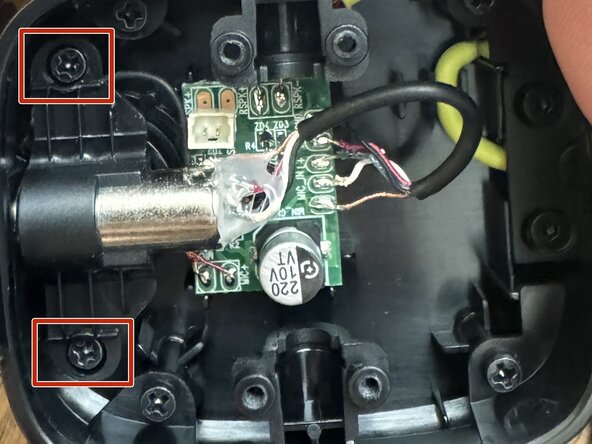
Unscrew the 2 Phillips screws holding the aux port.
-
Gently wiggle the port out of the enclosure. If you're having difficulty, try using the spudger to lift it out.
-
-
-
Ensure the microphone is flush against the outside of the housing. Make sure to pull through any excess wire so it isn't caught.
-
Screw the microphone back in using the Phillips screw. EDIT: Before fully tightening the screw, I found it was more secure if you extended the microphone (like when you have it by your mouth to speak) and tightening the screw while it was in that position.
-
My wires were still intact and I still had the screw, so that's all I needed to do. To put everything back together, just go in reverse.
-
-














To reassemble your device, follow these instructions in reverse order.
EDIT: I found that unscrewing the plastic frame FIRST was easier to have room to disconnect the battery, so I updated the guide as such.

