Introduction
The CCFL Inverter is a vital part of the Apple Studio Display monitor and if it fails the monitor will have serious display problems. The CCFL inverter is what provides the backlight for the monitor. If it fails, the screen will essentially become black. This part, however, can be replaced with a new board relatively easily.
What you need
-
-
First remove the three 2mm hex screws from the top of the monitors stand.
-
Then, remove the four 2mm hex screws on the corners of the back panel.
-
Finally, the back panels can be removed by pulling the main cable through the opening and sliding the panels away.
 Ask FixBot
-
-
-
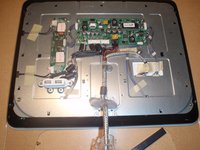
Remove the metal backing.
-
Remove the single screw at the top and the two screws at the bottom of the monitor with #2 philips head screwdriver.
-
Remove the transparent plastic around the USB ports.
-
Push metal backing toward back of monitor to release its clips and pull away.
-
-
-
-
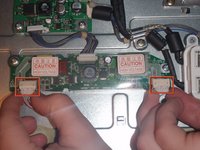
Remove the two cables on the left side of the board, using a pin to insert into the two small holes and then pull out.
-
-
-
Remove the ribbon cable on the right side of board by pulling it away from the LCD main board with hand.
-
-
-
Remove the top philips head screws holding the board to the monitor with #2 philips head screwdriver.
-
-
-
Remove the bottom philips head screw and pull the CCFL Inverter board away from monitor.
-
To replace this part with a new one, simply follow these directions in reverse using the new board.
-




Cancel: I did not complete this guide.
One other person completed this guide.

Team

Cal Poly, Team 13-27, Maness Winter 2010 Member of Cal Poly, Team 13-27, Maness Winter 2010
CPSU-MANESS-W10S13G27
4 Members
14 Guides authored
