Introduction
If the speaker in your Aorus X7 v2 gaming laptop isn't functioning properly, it is important to troubleshoot the issue to make sure replacing it is necessary.
Let’s begin:
First, make sure the sound is unmuted and the volume is turned up in the settings. This can be easily overlooked and it is important to make sure this is not the source of the issue before you proceed with opening up the laptop.
Another possibility is a problem with the settings. You can check this by going to settings and troubleshooting the speakers. This may allow you to avoid deconstructing the computer altogether.
Additionally, the computer could be having a cable issue either because of low-quality cables, or it may be that they are not connected correctly. This can be fixed by opening up the computer and checking the cables. If this is the problem, this guide will be a good reference to see where the cables should be connected.
If none of these suggestions fix the problem, then the speakers need to be replaced. Follow this guide if you need to replace the speakers of your Aorus X7 v2 gaming laptop.
Before beginning this repair, be sure to power off your laptop, disconnect from your charger, and remove the battery.
Let's get started!
What you need
-
-
-
Flip the closed laptop over to access its underside.
-
Remove the twelve screws holding the back panel on.
-
Remove the back panel.
-
Locate the faulty speakers.
-
Remove the two screws from the speaker on the right side of the computer.
 Ask FixBot
-
-
-
Tool used on this step:Tweezers$4.99
-
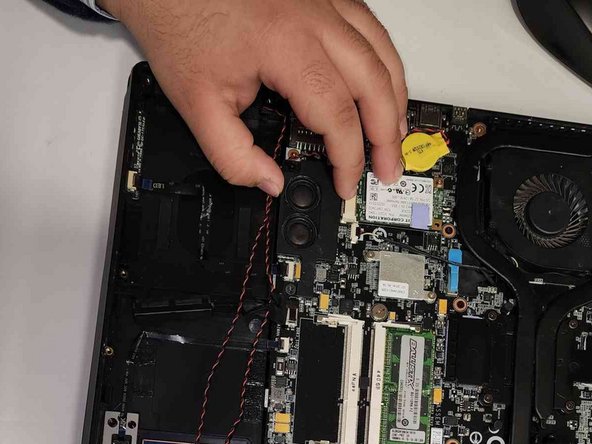
Remove the three screws holding the left speaker in place.
-
Disconnect the left and right speaker plugs using the tweezers.
-
-
-
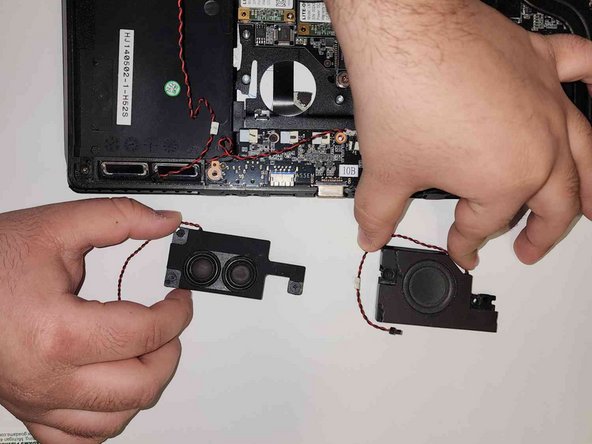
Carefully lift up the left and right speakers to remove them from the motherboard.
-
-


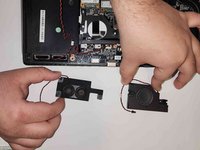
To reassemble your device, follow these instructions in reverse order.
Cancel: I did not complete this guide.
One other person completed this guide.

Team

Gateway, Team 1-4, Pee Fall 2022 Member of Gateway, Team 1-4, Pee Fall 2022
GCC-PEE-F22S1G4
3 Members
35 Guides authored
