
Anker Soundcore Space Q45 Bluetooth Module Replacement

Benjamin daCosta and 2 other contributors
Last updated on Jun 24, 2024
Views: 1.2K
View statistics:
- Past 24 Hours:
- 6
- Past 7 Days:
- 32
- Past 30 Days:
- 106
- All Time:
- 1,231
Comments: 7
3 comments on steps, 4 guide comments.
Go to guide commentsCompleted: 1 2
1 person has marked this guide "completed." Will you be next?
2 people have marked this guide "completed." Including you — great job!
Favorites: 1 2
1 person has favorited (and subscribed to) this guide. Will you be next?
2 people have favorited (and subscribed to) this guide — including you!
Better Introduction
Improve this guide by completing or revising its introduction.
Missing Details
Some of this guide's details are missing. Help users by adding tools, difficulty, or time.
Introduction
Go to step 1 ↓Is your Anker Soundcore Space Q45 bluetooth not connecting to your device, preventing you from using the device to its full capability? If so, here is a guide to fix the problem in a few easy steps.
What you need
Tools


-
-
-
Use the iFixit opening tool to disconnect three clips holding the outer covering in place.
-
Clips at 3 o'clock, 7 o'clock and 11 o'clock
-
Image shows right headphone, battery is in left.
 Ask FixBot
-
-
-
Remove three screws holding the inner plastic covering in place with a Phillips screwdriver.
-
Image shows right headphone, battery is in left.
-
-
-
-
-
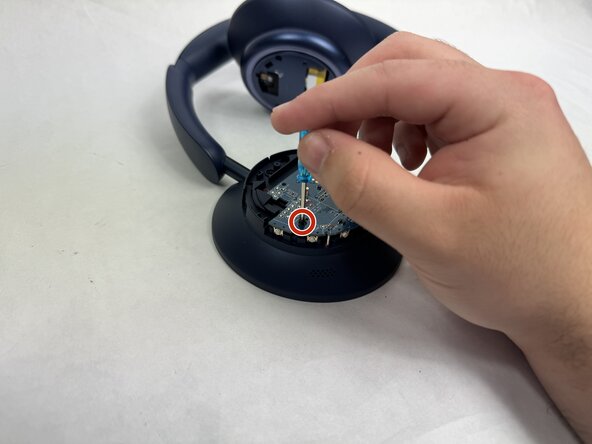
Remove two screws from the motherboard with a Phillips screwdriver.
-
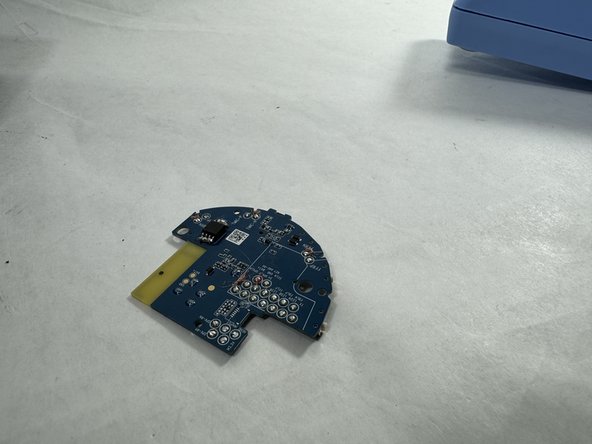
Remove the motherboard from the headphones.
-
-
-
-
-
-
Use a soldering iron to desolder the connection from the Bluetooth receiver.
-
-



To reassemble your device, follow these instructions in reverse order.
Cancel: I did not complete this guide.
One other person completed this guide.

Team

UMass Dartmouth, Team 4-3, Shaddix Spring 2024 Member of UMass Dartmouth, Team 4-3, Shaddix Spring 2024
UMASSD-SHADDIX-S24S4G3
5 Members
60 Guides authored
4 Guide Comments
please tell me the model of this microcircuit chip
mine was the GigaDevice 25L064ESIG flash chip, not bluetooth
