Introduction
This guide provides step-by-step instructions on how to remove the battery in your Anker Soundcore Select 3 A3172.
Located between the two speakers is a lithium-ion battery that powers the speaker when it is not connected to an external power source. Over time and through repeated charge cycles, the battery's capacity will decrease and it may eventually need to be replaced.
Before you begin the repair, ensure the Bluetooth speaker is completely powered off and disconnected from the charger and other peripherals.
Caution: If you notice the battery is puffy or smells bad, it may be swollen and can be dangerous to handle. The What to do with a swollen battery wiki includes important safety information for reference.
What you need
-
-
-
Place the Jimmy and the metal spudger between the seal of the cover and rubber of the speaker to separate them.
-
Slide the metal spudger around the perimeter of the case to loosen the glue.
 Ask FixBot
-
-
-
-
-
Use a Phillips #00 screwdriver to remove the eight 16.3 mm screws from the speaker frame.
-
-
-
-
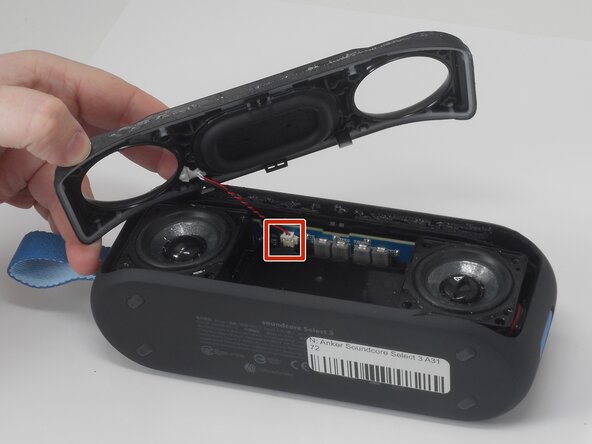
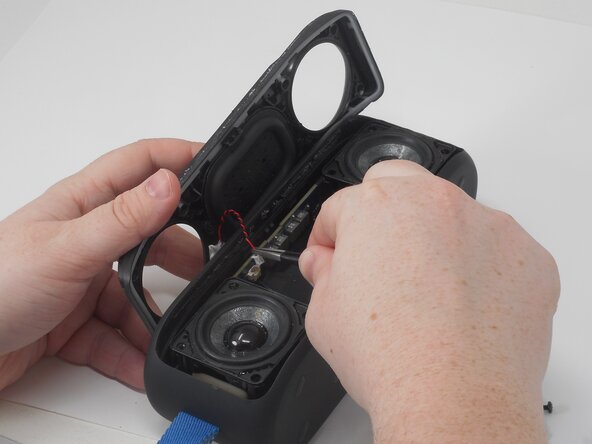
Lift the speaker frame enough to access the microphone module JST connector attached to both the frame and a circuit board located between the drivers.
-
Use a pair of tweezers to firmly grip the sides of the connector and pull straight away from the socket on the board.
-
Remove the frame.
-
-
-
-
-
Remove both speakers from the case to access both JST connectors that connect the speakers to the circuit board.
-
Hold the circuit board down and use a pair of tweezers to firmly grip the sides of the connector and pull straight away from the socket.
-
-
-
-
-
Use a Phillips #00 screwdriver to remove the three 11.5 mm screws securing the battery.
-
-
-
Move the battery out of the way.
-
Use the point of a spudger to push on alternating sides of the connector to "walk" it out of its socket.
-
If that doesn't work, hold the circuit board steady with one hand. Using tweezers, grip the connector as close to the socket as possible and pull it straight away from the socket to disconnect it.
-
Remove the battery from the case.
-
-
-
Use the iFixit opening tool to release the clips securing the battery case, and pry it open.
-
Remove both sides of the case from the battery.
-
-




To reassemble your device, follow these instructions in reverse order. Take your e-waste to an R2 or e-Stewards certified recycler.
Cancel: I did not complete this guide.
2 other people completed this guide.

Team

University of Memphis, Team 3-3, Sneed Spring 2026 Member of University of Memphis, Team 3-3, Sneed Spring 2026
UM-SNEED-S26S3G3
4 Members
72 Guides authored
