Introduction
This guide will show you how to replace the battery on the Anker Soundcore Select 2 A3125. You will need to perform this repair if your speaker no longer holds a charge, dies quickly, or only powers on while plugged in. Handle the battery carefully and strictly avoid using metal prying tools to remove it, as puncturing the cell can cause a fire.
Before beginning disassembly, we recommend reviewing our troubleshooting pages to rule out any software or alternative hardware issues.
Caution: If the battery appears swollen, puffy, or emits a strange odor, handle it with extreme care. Swollen batteries can catch fire or explode if damaged. Before proceeding, review the What to Do with a Swollen Battery guide.
Additionally, ensure the device is powered off and unplugged from the charger before you begin.
What you need
-
-
-
Insert a spudger between the front panel and the speaker housing.
-
Carefully work around the edges of the panel to release the clips securing it.
-
Gently remove the front panel from the main body of the device.
 Ask FixBot
-
-
-
-
-
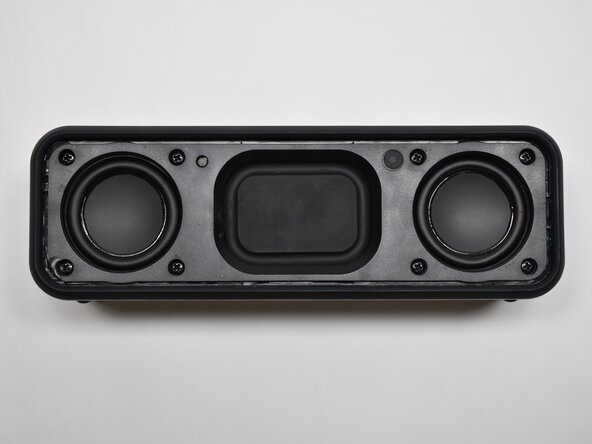
Remove the eight 10.0 mm screws from the speaker mount using a Phillips #0 screwdriver.
-
Insert a plastic spudger or opening tool between the speaker mount and speaker body to remove the speaker mount covering.
-
-
-
-
Gently lift one speaker up to access the connector on the main board.
-
Use tweezers to grip the plastic connector of the speaker cable and pull it straight out of the socket located on the motherboard.
-
-
-
-
-
Remove the five 5.0 mm screws holding the battery in place using a Phillips #0 screwdriver.
-
To disconnect the speaker panel, use tweezers to grip the plastic connector and pull it straight out of its socket on the motherboard.
-
-
-
Use a plastic opening tool to pry the battery out of the speaker casing.
-
Use tweezers to grip the plastic connector and pull it straight out of the socket located on the motherboard
-
Use a small amount of isopropyl alcohol or adhesive remover on a foam swab under the battery to soften the adhesive.
-
-



To reassemble your device, follow these instructions in reverse order. Take your e-waste to an R2 or e-Stewards certified recycler.

Team

Purdue University Northwest, Team 7-7, Dieterle Spring 2026 Member of Purdue University Northwest, Team 7-7, Dieterle Spring 2026
PNW-DIETERLE-S26S7G7
4 Members
48 Guides authored
