Introduction
The batteries on Anker Soundcore Q201i can be replaced easily. This guide details the process for replacing the battery in the Anker Soundcore Q20i. This procedure requires opening the ear cousins and unscrewing the screws and changing the battery.
What you need
-
-
-
Orient the headphones so that the side of the ear cushion is accessible.
 Ask FixBot
-
-
-
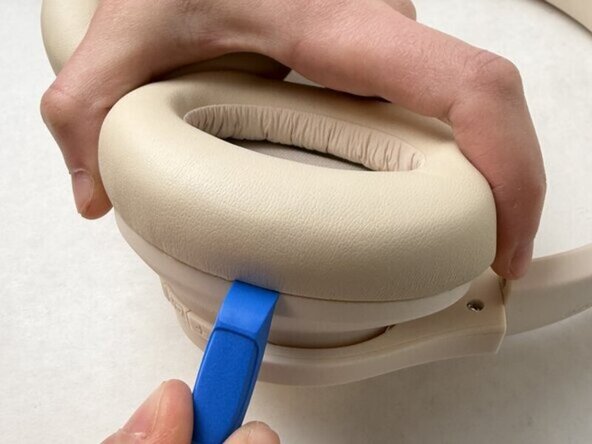
Insert an opening tool into the groove where the left ear pad meets the left driver assembly.
-
-
-
-
Use a Phillips #00 screwdriver to remove the four screws securing the driver assembly.
-
Lift off the driver assembly, with care not to strain the connected cables.
-
-
-
Desolder the two battery contacts from the board.
-
Use your index finger to lift the battery and remove it from the base.
-
-



To reassemble your device, follow the above steps in reverse order.
For optimal performance, after completing this guide, calibrate your newly installed battery.
Take your e-waste to an R2 or e-Stewards certified recycler.
Repair didn’t go as planned? Try some basic troubleshooting or ask our Answers community for help.

Team

UMass Dartmouth, Team 1-4, Biswokarma Spring 2026 Member of UMass Dartmouth, Team 1-4, Biswokarma Spring 2026
UMASSD-BISWOKARMA-S26S1G4
5 Members
60 Guides authored
