Introduction
As you use your speaker, you might encounter issues with the sound quality if it doesn’t cut out entirely. This may indicate the need for the Drivers in the speaker to be replaced. This guide will demonstrate the proper procedures for replacing your Anker Soundcore Boost A3145’s Drivers. It is important to note that your device should be fully powered off and unplugged before proceeding with the repair.
What you need
-
-
-
Insert a spudger between the base of the speaker and its body.
-
Along the seams of the base, begin prying at the hooks until you hear a “click”.
-
Once you get a slight lift, slowly glide the spudger throughout the base to unlatch all the hooks.
 Ask FixBot
-
-
-
Using the spudger, dig at the center of the speaker to pry at the adhesive keeping the remaining base attached (Utilize the image in Step 3 as a reference for where the adhesive is).
-
-
-
Lift the old base up and replace the new base, relatching the new base with a “click” for each hook.
-
-
-
-
-
Remove the eight 9 mm Phillips #0 screws from around the base plate.
-
Remove the six 6.3 mm Phillips #0 screws from around the battery cap.
-
Use a spudger to pry up the base plate.
-
-
-
-
Take off the battery cover.
-
Using a spudger that's ESD-safe, remove the battery from the chassis.
-
-
-
-
-
Remove the six 7.6 mm Phillips #0 screws that secure the outer shell.
-
-
-
Use a sharp or thin tool to separate the corners from the main portion of the speaker.
-
-
-
Use your fingers to open both sides, then push forward and remove the outer shell from the main portion of the speaker.
-
-
-
-
-
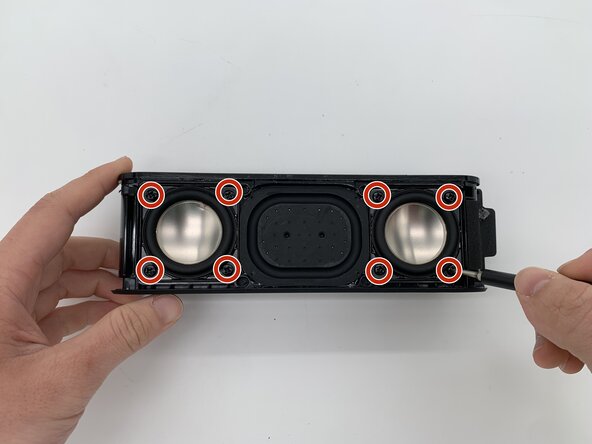
Remove the eight 7 mm Phillips #1 screws that secure the two drivers.
-
-
-
You should find wires wrapped in an insulator connected to the internals of the speaker. Grip the driver connectors and gently pry them out of their sockets.
-
-
-
Put your fingers on the back of the drivers inside the speaker; these are the silver circles seen best from the front.
-
Gently push them out.
-
-




To reassemble your device, follow the above steps in reverse order.
Take your e-waste to an R2 or e-Stewards certified recycler.
Repair didn’t go as planned? Try some basic troubleshooting or ask our Answers community for help.
Cancel: I did not complete this guide.
One other person completed this guide.

Team

University of North Texas, Team 1-5, Rea Spring 2026 Member of University of North Texas, Team 1-5, Rea Spring 2026
UNT-REA-S26S1G5
4 Members
60 Guides authored
