
Anker SoundCore 2 Speaker Replacement

Tripp Lersch and 2 other contributors
Last updated on Jun 8, 2021
Views: 8K
View statistics:
- Past 24 Hours:
- 7
- Past 7 Days:
- 50
- Past 30 Days:
- 215
- All Time:
- 8,014
Comments: 21
7 comments on steps, 14 guide comments.
Go to guide commentsCompleted: 4 5
4 people have marked this guide "completed." Will you be next?
5 people have marked this guide "completed." Including you — great job!
Favorites: 0 1
No one has favorited (and subscribed to) this guide. Will you be the first?
1 person has favorited (and subscribed to) this guide — and that's you!
Introduction
Go to step 1 ↓This is a simple guide on the replacement of the speaker within the Anker SoundCore 2. You may need to replace the speaker if it will not play at all, if there is sound delay, or if the speaker has blown out. Take a look at our troubleshooting page to see if you need to replace your speaker or not.
What you need
Tools
-
Spudger4.9


-
-
-
Insert a spudger between the front panel and the body of the speaker.
-
Pry around the edges of the front panel with the spudger to pry it away from the speaker body.
 Ask FixBot
-
-
-
-
-
Remove eight 10 mm screws from the speaker mount using a Phillips #0 screwdriver.
-
Insert a spudger in the gap between the speaker mount and speaker body to remove the speaker mount.
-
Use your hand to remove the speakers.
-
-
-
-
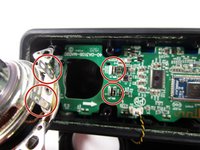
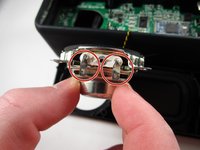
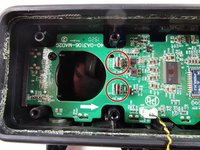
The speakers do not use wires so when replacing the speaker, make sure you align the metal prongs with the metal clips on the motherboard.
-
-


To reassemble your device, follow these instructions in reverse order.
Cancel: I did not complete this guide.
4 other people completed this guide.

Team

Illinois Wesleyan University, Team S1-G2, Bullock Spring 2021 Member of Illinois Wesleyan University, Team S1-G2, Bullock Spring 2021
IWU-BULLOCK-S21S1G2
3 Members
60 Guides authored
14 Guide Comments
Excellent guide, my speaker falls to the ground, and one of two speaker stops working, disassemble and verifying, was the speaker clip was loose
Where can I buy a speaker for the repair ? Or will any sized speaker work ?
@philcuchetti I have a soundcore select 1 which is an older model and it seems to have the same speaker which I found here https://www.aliexpress.com/item/10050091...
Do someone get a new speaker? I need to buy one!
