Introduction
Use this guide to replace the rear case on an Anbernic RG35XX.
What you need
-
-
Remove the SD card located on the right side of the device by pushing into the SD card slot and pulling the card out.
-
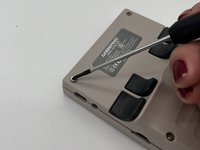
Remove the six 1.2 mm screws that secure the back case with a 1.5 Hex Bit screwdriver.
 Ask FixBot
-
-
-
-
Insert an opening tool into the MicroSD card slot and twist it clockwise to begin releasing the rear case.
-
Pry around the entire perimeter until the rear case fully releases.
-
Remove the rear case.
-



To reassemble your device, follow the above steps in reverse order.
Take your e-waste to an R2 or e-Stewards certified recycler.
Repair didn’t go as planned? Try some basic troubleshooting or ask our Answers community for help.
Cancel: I did not complete this guide.
One other person completed this guide.


