Introduction
In this fix we will be looking at how to replace the internal battery used to store electrical charge for the device. This will require a Phillips #1 screwdriver, a small plastic tool to remove the LCD screen and to remove the battery.
Good Luck!
What you need
-
-
First, unscrew the 4 M2x1.5-7 screws (7mm length) from the back of the device using a number 1 Phillips screwdriver.
-
Pry the front silver panel away from the back black panel with a plastic opening tool.
 Ask FixBot
-
-
-
Next, the ribbon cable needs to be carefully removed from the back of the LCD screen.
-
Use a plastic opening tool to press the black bar towards the ribbon and away from the white bar gently. This will release the ribbon.
-
-
-
-
Remove the 4 M2x1.5-7 screws (7mm length) from the green PCB board.
-
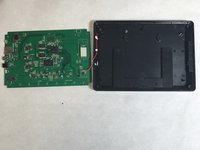
This will result in two pieces, the back black cover and the PCB board.
-
-
Tool used on this step:Tweezers$4.99
-
The battery can then be popped out using precision tweezers and replaced with a new one.
-




To reassemble your device, follow these instructions in reverse order.
Cancel: I did not complete this guide.
One other person completed this guide.

Team

IUPUI, Team S1-G2, Harley Fall 2017 Member of IUPUI, Team S1-G2, Harley Fall 2017
IUPUI-HARLEY-F17S1G2
4 Members
3 Guides authored
