Free Shipping on Domestic Orders $75+

Amazon Fire TV Cube Speaker Replacement

What you need

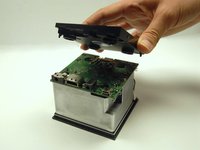
    1. Amazon Fire TV Cube Speaker Replacement, Speaker: step 1, image 1 of 3 Amazon Fire TV Cube Speaker Replacement, Speaker: step 1, image 2 of 3 Amazon Fire TV Cube Speaker Replacement, Speaker: step 1, image 3 of 3
      • Using a metal spudger, push down between the edge seals on the base and pry off the base.

      • Do not confuse the top thin layer of rubber with the thick palette that needs to be removed.

      • This may require substantial force.

      Ask FixBot

      Add Comment

    2. Amazon Fire TV Cube Speaker Replacement: step 2, image 1 of 3 Amazon Fire TV Cube Speaker Replacement: step 2, image 2 of 3 Amazon Fire TV Cube Speaker Replacement: step 2, image 3 of 3
      • Use the T-10 bit from the iFixit tool kit to unscrew the four 1.4 inch corner screws on top of the first layer.

      • There are 4 washers to go with each of the screws.

      Ask FixBot

      Add Comment

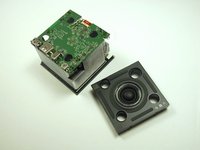
    3. Amazon Fire TV Cube Speaker Replacement: step 3, image 1 of 1
      • Lift and remove the full frame.

      Ask FixBot

      Add Comment

    4. Amazon Fire TV Cube Speaker Replacement: step 4, image 1 of 2 Amazon Fire TV Cube Speaker Replacement: step 4, image 2 of 2
      • Lift and remove the speaker.

      • Carefully match the outlets on the speaker with the outlets on the motherboard.

      Ask FixBot

      Add Comment

Conclusion

To reassemble your device, follow these instructions in reverse order.

Cancel: I did not complete this guide.

2 other people completed this guide.

1 Guide Comment

Our volume pauses every 11 minutes! Troubleshooting our Sono’s System…still doing it. Could this be our Fire Cube?

Lee - Reply Share

Add Comment

View Statistics:

Past 24 Hours: 2

Past 7 Days: 8

Past 30 Days: 30

All Time: 3,937