Free Shipping on Domestic Orders $75+

Amazon Echo Studio Motherboard Replacement

Views: 2.6K

View statistics:

Past 24 Hours:
5
Past 7 Days:
34
Past 30 Days:
134
All Time:
2,595
Comments: 17

11 comments on steps, 6 guide comments.

Go to guide comments
Completed: 0

No one has marked this guide "completed." Will you be the first?

Favorites: 0

No one has favorited (and subscribed to) this guide. Will you be the first?

Time Required: 45 minutes - 1 hour
Difficulty: Moderate
Featured Student Guide

This guide has been the hard work of our awesome students and is found to be exceptionally cool by the iFixit staff.

Amazon Echo Studio Motherboard Replacement

Introduction

Go to step 1 ↓

The Echo Studio motherboard is located deep in the device, and other components must be extracted to reach the motherboard. Causes of a faulty motherboard include the device being dropped from a high distance, repeated button use, etc... If there are signs of a faulty motherboard, such as not carrying out proper functions, access the motherboard with this guide.

What you need

Tools

    1. Amazon Echo Studio Motherboard Replacement, Power Supply Board: step 1, image 1 of 3 Amazon Echo Studio Motherboard Replacement, Power Supply Board: step 1, image 2 of 3 Amazon Echo Studio Motherboard Replacement, Power Supply Board: step 1, image 3 of 3
      • Flip the device upside down.

      • Pry up the edge of the rubber base panel with a spudger, then pull the rest of it off by hand.

      Ask FixBot

      Add Comment

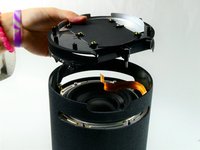
    2. Amazon Echo Studio Motherboard Replacement: step 2, image 1 of 3 Amazon Echo Studio Motherboard Replacement: step 2, image 2 of 3 Amazon Echo Studio Motherboard Replacement: step 2, image 3 of 3
      • Use a T15 Torx screwdriver to remove the nine 3.2 mm screws.

      • Use a Torx T10 screwdriver to remove the six 2.7 mm screws.

      • After removing the screws, gently lift the base off, with care not to damage any of the connected cables.

      Ask FixBot

      Add Comment

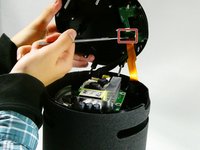
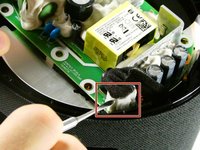
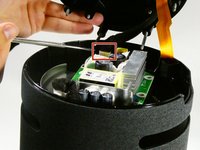
    3. Amazon Echo Studio Motherboard Replacement: step 3, image 1 of 3 Amazon Echo Studio Motherboard Replacement: step 3, image 2 of 3 Amazon Echo Studio Motherboard Replacement: step 3, image 3 of 3
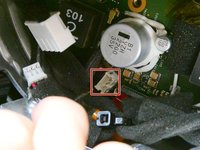
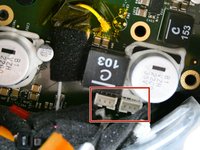
      • Before fully removing the base, remove the three attached connectors.

      Ask FixBot

      Add Comment

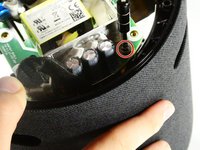
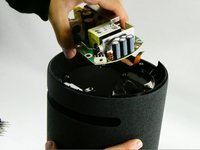
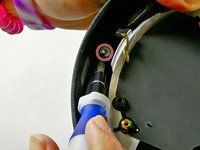
    4. Amazon Echo Studio Motherboard Replacement: step 4, image 1 of 2 Amazon Echo Studio Motherboard Replacement: step 4, image 2 of 2
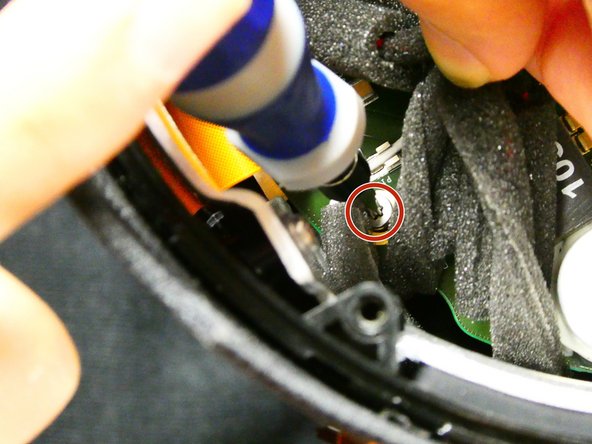
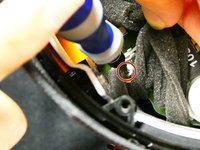
      • Now unscrew the the single 10 mm Phillips screw.

      • Remove the power supply board.

      Ask FixBot

      Add Comment

    1. Amazon Echo Studio Motherboard Replacement, Subwoofer: step 5, image 1 of 1
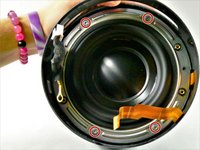
      • Remove the two screws located across from each other on the outside of the plastic ring shown.

      • Remove the plastic outer ring that hugs the inside of the edges of the device.

      • This may require you to use a soft prying tool to separate it from the outer shell.

      Ask FixBot

      Add Comment

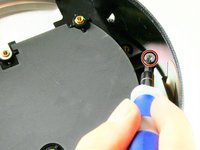
    2. Amazon Echo Studio Motherboard Replacement: step 6, image 1 of 3 Amazon Echo Studio Motherboard Replacement: step 6, image 2 of 3 Amazon Echo Studio Motherboard Replacement: step 6, image 3 of 3
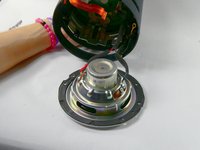
      • Remove the two 2.7 mm screws with a T10 Torx screwdriver.

      • Once the screws are removed, take the power supply's baseplate out of the unit.

      • You may need to gently pry the subwoofer's air ports from the round slots In the side of the unit.

      Ask FixBot

      Add Comment

    3. Amazon Echo Studio Motherboard Replacement: step 7, image 1 of 2 Amazon Echo Studio Motherboard Replacement: step 7, image 2 of 2
      • On the silver ring located on the outer edge of the plastic portion of the subwoofer, you will see four 2.7 mm screws. Use a Torx T10 screwdriver to remove them, in order to remove of the subwoofer.

      • Once the four screws have been removed, gently pull the subwoofer out as to not damage the wiring connecting the subwoofer to the main board inside the unit.

      • Follow the wires from the subwoofer to the main board and disconnect the connector attaching them.

      • Your subwoofer is now disconnected and ready to be replaced.

      Ask FixBot

      Add Comment

    1. Amazon Echo Studio Motherboard Replacement, Motherboard: step 8, image 1 of 2 Amazon Echo Studio Motherboard Replacement, Motherboard: step 8, image 2 of 2
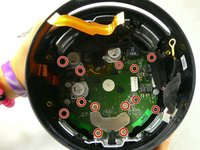
      • Remove the thirteen 9 mm Phillips #00 screws.

      • Some screws may be hidden by other components; simply hold them out of your way during screw removal.

      Ask FixBot

      Add Comment

    2. Amazon Echo Studio Motherboard Replacement: step 9, image 1 of 1
      • Unfasten the Phillips 9mm screws, using the Phillips #00 Screwdriver.

      • There may be obstruction against some screws, which can be avoided by using a spudger or your hand.

      Ask FixBot

      Add Comment

    3. Amazon Echo Studio Motherboard Replacement: step 10, image 1 of 3 Amazon Echo Studio Motherboard Replacement: step 10, image 2 of 3 Amazon Echo Studio Motherboard Replacement: step 10, image 3 of 3
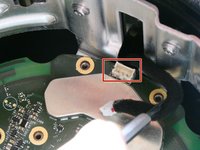
      • After removing the screws, locate the four power connectors on the motherboard and detach them from the motherboard.

      Ask FixBot

      Add Comment

    4. Amazon Echo Studio Motherboard Replacement: step 11, image 1 of 1
      • Remove the motherboard from the device by pulling it out.

      • Be careful to not damage any of the loose wires inside the case while removing the motherboard.

      Ask FixBot

      Add Comment

Conclusion

To reassemble your device, follow these instructions in reverse order.

Cancel: I did not complete this guide.

Colin Nicoll

Member since: 10/26/22

109 Reputation

1 Guide authored

Team

UMass Dartmouth, Team 2-6, Petersen Fall 2022 Member of UMass Dartmouth, Team 2-6, Petersen Fall 2022

UMASSD-PETERSEN-F22S2G6

4 Members

72 Guides authored

6 Guide Comments

where can I buy a motherboard replacement ?

Juan Daniel Hernandez R - Reply Share

I also would like to know where to get a motherboard... my studio is stuck at the green ring.

Ed Wilcox - Reply Share

i also would like to know. mine stuck with cyan circle

Алексей - Reply Share

Is there any place to buy the Amazon Echo Studio Motherboard?

DOCA - Reply Share

hi is there a place to buy this motherboard?

Bede Bede - Reply Share

Add Comment

View Statistics:

Past 24 Hours: 5

Past 7 Days: 34

Past 30 Days: 134

All Time: 2,595