Introduction
This guide will walk you through the replacement process for the woofer found within your Amazon Echo Show 10 3rd Gen device. The woofer is responsible for the output of lower frequency sounds and may need replacement if not functioning properly. The malfunctioning of this component can be seen through distorted audio or the complete absence of sound.
Make sure other solutions found within the Amazon Echo Show 10 3rd Gen troubleshooting page (such as unmuting your Echo or toggling 'Do Not Disturb' off) have been attempted before committing to disassembly and replacement.
This replacement guide requires the user to solder components within the device. For more information on how to solder and desolder connections, please refer to the guide linked here.
What you need
-
-
-
With the echo device standing upright, firmly grip the base and use the blue opening tool to gently pry the lid from the mesh speaker base.
-
Remove the lid and set it aside.
 Ask FixBot
-
-
-
Use a Phillips #2 screwdriver to remove the six 13 mm screws along the perimeter of the speaker.
-
-
-
-
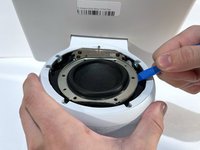
Use an opening tool to pry up along the edge of the speaker.
-
Gently lift the woofer out of the device.
-
-
-
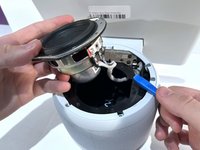
Tilt the woofer so the side with the cables is angled upwards.
-
Desolder the three separate cable connectors from the woofer attached to the plate using a soldering iron.
-
-
-
After desoldering the three cables, lift the woofer out of the shell of the device.
-
-




To reassemble your device, follow these instructions in reverse order.

Team

Western Carolina University, Team 1-4, Virtue Fall 2023 Member of Western Carolina University, Team 1-4, Virtue Fall 2023
WCU-VIRTUE-F23S1G4
4 Members
18 Guides authored
