This translation was generated by a machine and has not been reviewed by a person yet. Speak this language? Review it.

Altyk le Petit PC SSD Replacement

INFOREA and one other contributor
Last updated on Sep 2, 2026
Views: 239
View statistics:
- Past 24 Hours:
- 2
- Past 7 Days:
- 10
- Past 30 Days:
- 64
- All Time:
- 239
Comments: 0
No one has left comments on this guide. Will you be first?
Go to guide commentsCompleted: 1 2
1 person has marked this guide "completed." Will you be next?
2 people have marked this guide "completed." Including you — great job!
Favorites: 0 1
No one has favorited (and subscribed to) this guide. Will you be the first?
1 person has favorited (and subscribed to) this guide — and that's you!
Community-Contributed Guide
An awesome member of our community made this guide. It was not created by iFixit staff.
Missing Details
Some of this guide's details are missing. Help users by adding tools, difficulty, or time.
Introduction
Go to step 1 ↓Replace the SSD in your Altyk le Petit PC.
What you need
Tools

-
-
-
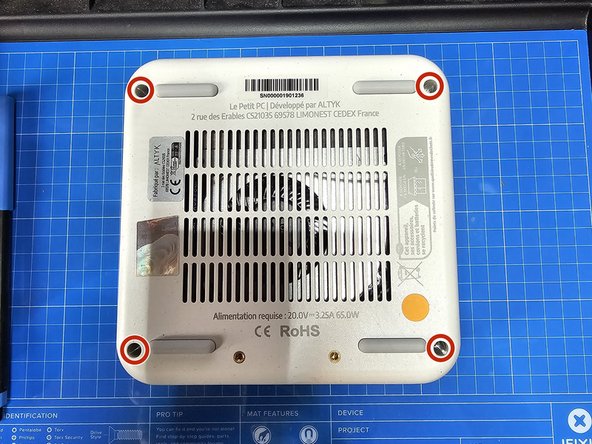
First, unplug your machine from the power outlet, then turn it over and locate the 4 screws in the 4 corners underneath the machine. The screws are Phillips; you will need a screwdriver with a long shaft.
 Ask FixBot
-
-
-
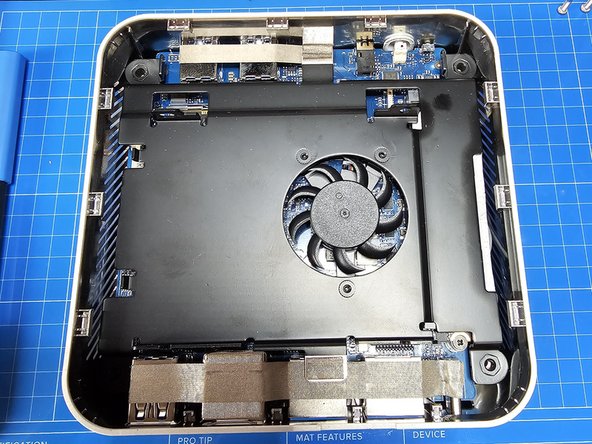
Locate the small notch between the two Ethernet ports on the top. Use your fingernail or an opening pick to pry up the machine's cover.
-
-
-
Lift the active cooling system for the SSD and RAM by grabbing it from a corner to reveal the cooling fan connector, and then disconnect it.
-
-
-
-
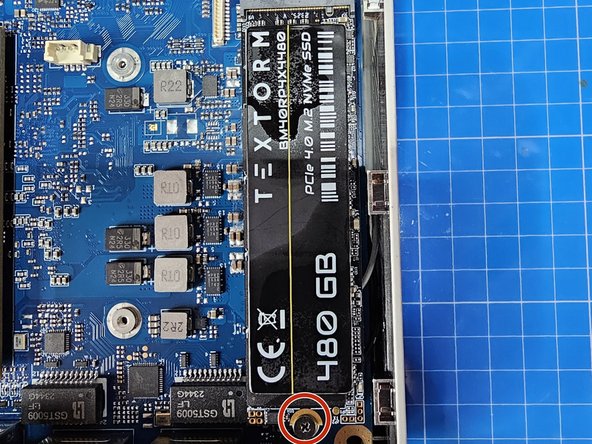
The SSD is an M.2 NVMe 2280 form factor. The original is 480 GB. To do this, you need to unscrew the screw holding it in place; the SSD will lift up on its own and you will be able to remove it. Simply replace it with the new one in the same way.
-
All you have to do is reassemble everything, and you're done :)
-
-




To reassemble your device, follow the instructions in reverse order.
Cancel: I did not complete this guide.
One other person completed this guide.

