
Altec Lansing VersA Smart Micro USB Port Replacement

Rachael Hopp and 3 other contributors
Last updated on Jan 4, 2019
Views: 1.4K
View statistics:
- Past 24 Hours:
- 1
- Past 7 Days:
- 12
- Past 30 Days:
- 49
- All Time:
- 1,376
Comments: 0
No one has left comments on this guide. Will you be first?
Go to guide commentsCompleted: 1 2
1 person has marked this guide "completed." Will you be next?
2 people have marked this guide "completed." Including you — great job!
Favorites: 0 1
No one has favorited (and subscribed to) this guide. Will you be the first?
1 person has favorited (and subscribed to) this guide — and that's you!
Introduction
Go to step 1 ↓If you are having an issue with your device not charging, access and replace the Micro USB charging port using this guide.
What you need
Tools
-
-
-
Spudger4.9


-
-
-
Use blue plastic opening tool to remove the external speaker face by placing it in the slight opening at the bottom.
-
Use a lever motion, push the tool down, lifting the speaker face.
-
Use fingers to grip and remove speaker face.
-
Repeat on reverse side to remove the second speaker face.
-
-
-
Orient speaker so volume buttons are facing away from you, and Bluetooth and power buttons are on the left-hand side.
-
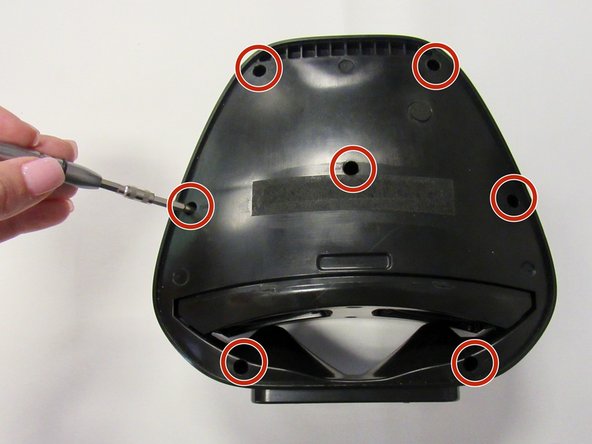
Remove the seven 14mm screws using the Phillips #1 screwdriver.
-
-
-
Reorient speaker so Bluetooth and power buttons are now on the right-hand side.
-
Separate the two panels along the crease.
-
Blue plastic opening tool may be needed to separate panels.
-
Remove the panel with no buttons to expose internal area of the device.
-
-
-
-
Remove the plactic piece containing the Micro USB port from its designated slot, found below the speakers.
-
-
-
-
Remove the small black plastic piece that was held in place by the two 10 mm screws and covers the Micro USB port.
-
-
-
Use the black plastic spudger to lightly push the Micro USB piece out of the external plastic piece.
-
-

 Ask FixBot




To reassemble your device, follow these instructions in reverse order.
Cancel: I did not complete this guide.
One other person completed this guide.

Team

University of Alabama, Team S1-G3, Bedsole Fall 2018 Member of University of Alabama, Team S1-G3, Bedsole Fall 2018
UA-BEDSOLE-F18S1G3
3 Members
72 Guides authored
