Free Shipping on Domestic Orders $75+

Altec Lansing BoomJacket Case Removal

What you need

  1. Altec Lansing BoomJacket Case Removal, Case Removal: step 1, image 1 of 1
    • Using your hands, remove the pegs (4+4) from the front and back of the speaker.

    Ask FixBot

    Add Comment

  2. Altec Lansing BoomJacket Case Removal: step 2, image 1 of 1
    • Remove the outer black rubber housing of the speaker.

    Ask FixBot

    Add Comment

  3. Altec Lansing BoomJacket Case Removal: step 3, image 1 of 1
    • Remove the inner blue rubber housing from the speaker.

    Ask FixBot

    Add Comment

  4. Altec Lansing BoomJacket Case Removal: step 4, image 1 of 1
    • Pull out the two black wire meshes using a metal spudger.

    • Be careful not to damage the metal casing.

    Ask FixBot

    Add Comment

  5. Altec Lansing BoomJacket Case Removal: step 5, image 1 of 2 Altec Lansing BoomJacket Case Removal: step 5, image 2 of 2
    Tool used on this step:
    Tweezers
    $4.99
    Buy
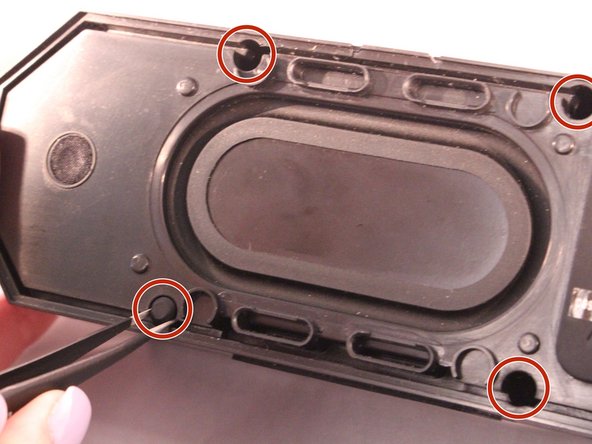
    • Using tweezers remove the rubber stoppers (4 at the back + 2 at the front).

    Ask FixBot

    Add Comment

  6. Altec Lansing BoomJacket Case Removal: step 6, image 1 of 1
    • Using the size PH1 screwdriver remove the screws exposed from the rubber stoppers (4 + 2).

    Ask FixBot

    Add Comment

  7. Altec Lansing BoomJacket Case Removal: step 7, image 1 of 1
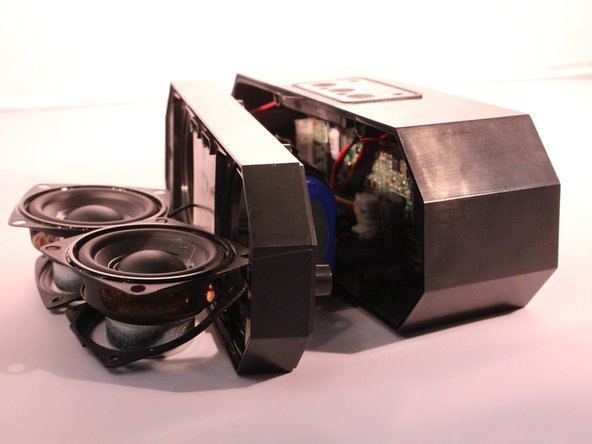
    • Pull the case apart and you will be able to see all the components inside the speaker.

    Ask FixBot

    Add Comment

Conclusion

To reassemble your device, follow these instructions in reverse order.

Cancel: I did not complete this guide.

1 Guide Comment

Can you buy the black rubber case by it’s self

David O Connor - Reply Share

Add Comment

View Statistics:

Past 24 Hours: 0

Past 7 Days: 2

Past 30 Days: 24

All Time: 1,061