
Altec Lansing BoomJacket Battery Replacement

Ryan Byrnes and 2 other contributors
Last updated on Jun 26, 2017
Views: 16K
View statistics:
- Past 24 Hours:
- 2
- Past 7 Days:
- 19
- Past 30 Days:
- 109
- All Time:
- 16,161
Comments: 11
5 comments on steps, 6 guide comments.
Go to guide commentsCompleted: 5 6
5 people have marked this guide "completed." Will you be next?
6 people have marked this guide "completed." Including you — great job!
Favorites: 1 2
1 person has favorited (and subscribed to) this guide. Will you be next?
2 people have favorited (and subscribed to) this guide — including you!
Introduction
Go to step 1 ↓Is your Altec Lansing BoomJacket having charging issues or will not charge at all? Replacing the battery may help.
What you need
Parts
-
×16
-
×6
Tools


-
-
-
Using your hands, remove the pegs (4+4) from the front and back of the speaker.
 Ask FixBot
-
-
Tool used on this step:Tweezers$4.99
-
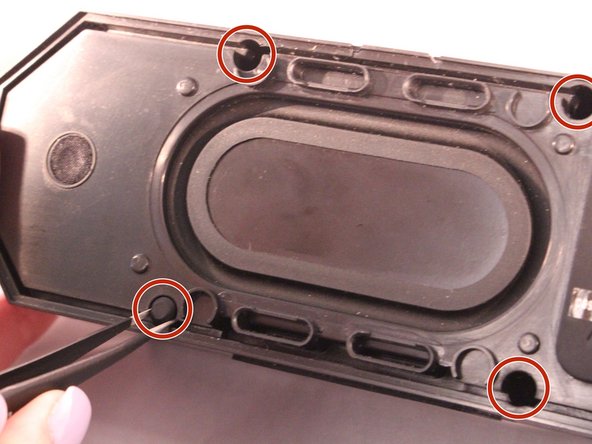
Using tweezers remove the rubber stoppers (4 at the back + 2 at the front).
-
-
-
Using the size PH1 screwdriver remove the screws exposed from the rubber stoppers (4 + 2).
-
-
-
-
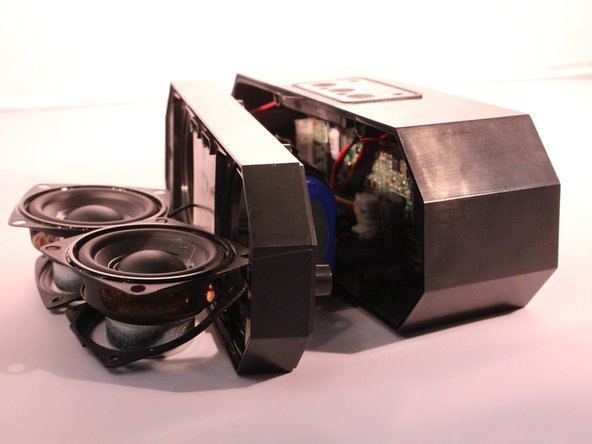
Pull the case apart and you will be able to see all the components inside the speaker.
-
-
-
-
-
The battery will be sitting right behind the speakers when the case is open.
-
-






To reassemble your device, follow these instructions in reverse order.
Cancel: I did not complete this guide.
5 other people completed this guide.

Team

Eastern Washington University, Team S2-G2, Rowley Spring 2017 Member of Eastern Washington University, Team S2-G2, Rowley Spring 2017
EWU-ROWLEY-S17S2G2
4 Members
60 Guides authored
6 Guide Comments
Where can you buy a replacement battery?
Where can I find ghe batteries? What type of battery ?
where ca i buy a replacement battery
This tutorial is incomplete.
