Introduction
The Altec Lansing Baby Boom XL Portable Bluetooth Speaker is the device and the model number is IMW270. The alternate names other than the standard name of “Baby Boom XL” can be listed as Altec Lansing Baby Boom XL Waterproof Bluetooth Speaker, Altec Lansing IMW270, and Baby Boom XL 2 pack (when sold in bundles). There are no different model names for the device, although there are five different colors. This guide will show how to replace the speaker driver in the Baby Boom XL. It is meant for users who are having problems with sound quality that cannot be fixed through basic troubleshooting. The speaker driver is the part inside the device that produces sound by converting electrical signals into audio. It is important for the performance of the speaker because it controls how clear and loud the audio is. If the speaker driver is damaged, the device may have muffled sound, low volume, distorted audio, or no sound at all. Before using this guide, make sure the issue is not caused by something simple such as a low battery, Bluetooth connection problems, or the device it is connected to. Before starting, power off the speaker completely and disconnect it from any charging cables. If the device has been exposed to water, allow it to fully dry before beginning the replacement.
What you need
-
-
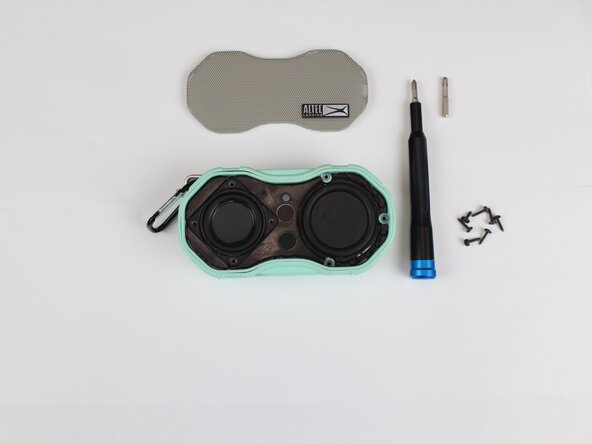
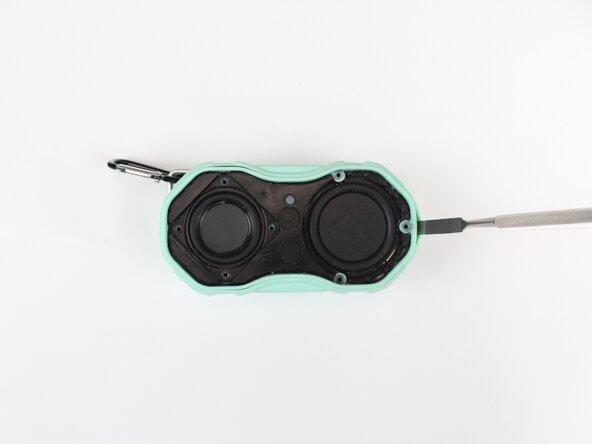
Starting with the seam between the grille and body, pry open the speaker using the metal spudger.
 Ask FixBot
-
-
-
Remove the seven 11.1 mm screws using a Phillips #2 screwdriver.
-
Place the loose screws onto the magnetic project mat.
-
-
-
-
Insert a spudger between the front speaker components and the housing.
-
Gently separate the components.
-
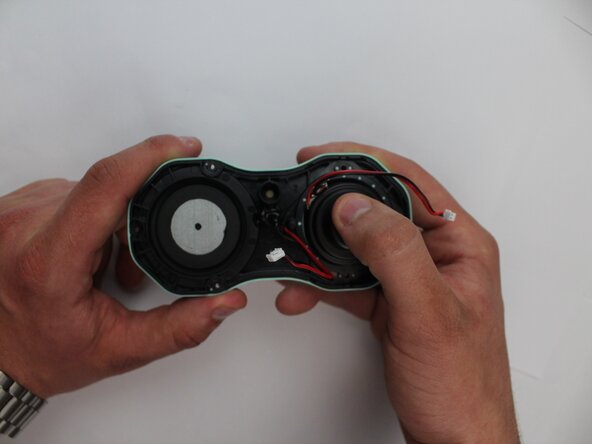
Lift the components slightly to expose the internal wiring.
-
-
-
Separate the top half of the device from the bottom half.
-
Press the speaker driver out of the housing.
-
Remove the speaker driver from the device.
-








To reassemble your device, follow the above steps in reverse order.
Take your e-waste to an R2 or e-Stewards certified recycler.
Repair didn’t go as planned? Try some basic troubleshooting or ask our Answers community for help.

Team

Texas Tech, Team 41-4, Johansen Spring 2026 Member of Texas Tech, Team 41-4, Johansen Spring 2026
TTU-JOHANSEN-S26S41G4
5 Members
6 Guides authored
