
Alienware X51 Disc Drive Replacement

Zach Li and 4 other contributors
Last updated on May 29, 2024
Views: 1K
View statistics:
- Past 24 Hours:
- 2
- Past 7 Days:
- 14
- Past 30 Days:
- 66
- All Time:
- 1,011
Comments: 0
No one has left comments on this guide. Will you be first?
Go to guide commentsCompleted: 1 2
1 person has marked this guide "completed." Will you be next?
2 people have marked this guide "completed." Including you — great job!
Favorites: 0 1
No one has favorited (and subscribed to) this guide. Will you be the first?
1 person has favorited (and subscribed to) this guide — and that's you!
Introduction
Go to step 1 ↓If your Alienware X51 disc drive is damaged or broken, it's crucial to replace it promptly to ensure uninterrupted performance. The replacement process should be straightforward, allowing you to resume using your Alienware X51 quickly. The disc drive is essential for reading and accessing discs, and when malfunctioning, it can lead to various symptoms such as difficulty reading discs or complete failure to function. Refer to our troubleshooting guide for detailed assistance in diagnosing and addressing these issues effectively.
What you need
Tools

-
-
-
Place the PC so the name "Alienware" is on top and facing you.
-
Slide the front panel towards you and lift up.
 Ask FixBot
-
-
-
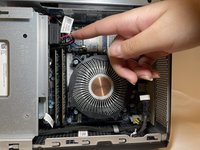
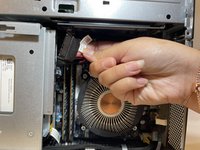
Fully disconnect the panel by unplugging the lighting cord going into the PC's internal system.
-
Remove the front panel from the rest of the device.
-
-
-
-
-
-
Remove the one 1.0 mm screw using a Phillips #1 screwdriver.
-
Remove the disc drive from the PC.
-



To reassemble your device, follow these instructions in reverse order.
Cancel: I did not complete this guide.
One other person completed this guide.

Team

Eastern Washington University, Team 1-2, Carnegie Fall 2023 Member of Eastern Washington University, Team 1-2, Carnegie Fall 2023
EWU-CARNEGIE-F23S1G2
4 Members
60 Guides authored
