Free Shipping on Domestic Orders $75+

Alienware 17 R3 Display Replacement

What you need

    1. Alienware 17 R3 Display Replacement, Display: step 1, image 1 of 1
      Tool used on this step:
      Anti-Static Wrist Strap
      $7.95
      Buy
      • Turn the computer off.

      • Disconnect the charging cable from the computer.

      • Failure to unplug the charging cable could result in damaging the computer or seriously injuring yourself.

      • Flip the computer upside down.

      • Wear the anti-static wrist strap to prevent any electrical shock to the components. Shocks may damage the components.

      Ask FixBot

      Add Comment

    2. Alienware 17 R3 Display Replacement: step 2, image 1 of 1
      • Unscrew and remove the two 4mm Phillips screws from cover.

      Ask FixBot

      Add Comment

    3. Alienware 17 R3 Display Replacement: step 3, image 1 of 1
      • Pull up and slide cover off.

      Ask FixBot

      Add Comment

    4. Alienware 17 R3 Display Replacement: step 4, image 1 of 2 Alienware 17 R3 Display Replacement: step 4, image 2 of 2
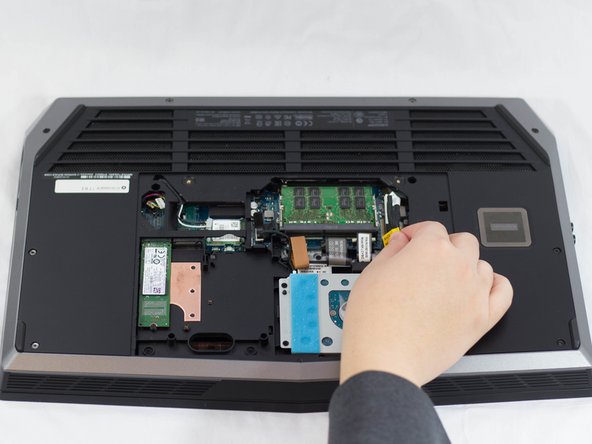
      • Unplug the black wire with the yellow tag to disconnect the battery.

      Ask FixBot

      Add Comment

    5. Alienware 17 R3 Display Replacement: step 5, image 1 of 1
      • Using the plastic opening tool, pull display casing away from main body.

      Ask FixBot

      Add Comment

    6. Alienware 17 R3 Display Replacement: step 6, image 1 of 1
      • Unscrew and remove the two 2mm Phillips screws from the bottom of the display.

      Ask FixBot

      Add Comment

    7. Alienware 17 R3 Display Replacement: step 7, image 1 of 1
      • Disconnect plugs connecting the display to the main body.

      Ask FixBot

      Add Comment

    8. Alienware 17 R3 Display Replacement: step 8, image 1 of 1
      • Lift display out.

      Ask FixBot

      Add Comment

Conclusion

To reassemble your device, follow these instructions in reverse order.

Cancel: I did not complete this guide.

7 other people completed this guide.

Jonathon Tschurwald

Member since: 02/01/17

878 Reputation

4 Guides authored

Team

UW Tacoma, Team 1-1, Rose Winter 2017 Member of UW Tacoma, Team 1-1, Rose Winter 2017

UWT-ROSE-W17S1G1

3 Members

48 Guides authored

1 Guide Comment

The best and easiest way to replace the screen!

Jhun Calvin - Reply Share

Add Comment

View Statistics:

Past 24 Hours: 1

Past 7 Days: 18

Past 30 Days: 66

All Time: 5,042