
Alcatel Pop 4 Plus Power/Volume Button Rocker Replacement

Anna Gongre and
Last updated on May 7, 2024
Views: 772
View statistics:
- Past 24 Hours:
- 3
- Past 7 Days:
- 15
- Past 30 Days:
- 61
- All Time:
- 772
Comments: 0
No one has left comments on this guide. Will you be first?
Go to guide commentsCompleted: 0 1
No one has marked this guide "completed." Will you be the first?
1 person has marked this guide "completed." It's you — great job!
Favorites: 0 1
No one has favorited (and subscribed to) this guide. Will you be the first?
1 person has favorited (and subscribed to) this guide — and that's you!


Introduction
Go to step 1 ↓Caution: Handling of Sharp Objects
Please use caution when handling tweezers and keep out of reach of children.
If you notice that your phone has a delay in locking or turning the volume up and down, it is recommended that you change your Power/Volume button rocker.
-
-
-
Begin by removing the back of the phone. Press your nail or a thin object in the bottom right-hand corner of the phone and gently press to release the back of the phone from the front.
 Ask FixBot
-
-
-
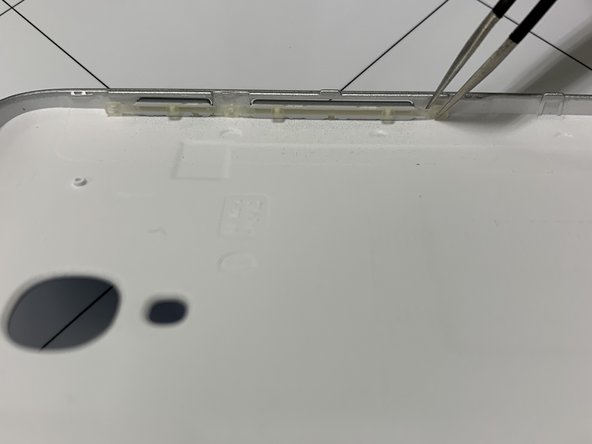
Once removed completely, use the back portion to disassemble the Power/Volume Button Rocker.
-
-
-
Tool used on this step:Tweezers$4.99
-
Remove the middle insert of the elastic on the Power/Volume button rocker with tweezers.
-
-
-
Once removed, place new rocker in same elastic slots. Follow instructions backwards to reassemble.
-
-




To reassemble your device, follow these instructions in reverse order.

Team

University of North Alabama, Team S1-G5, Winner Fall 2019 Member of University of North Alabama, Team S1-G5, Winner Fall 2019
UNA-WINNER-F19S1G5
3 Members
36 Guides authored
