Introduction
In the case that your device is unable to power on, their may be a problem with its battery. This guide will show you have to replace the battery for the Alcatel One Touch Pop 7.
What you need
-
-
-
Begin by opening SD port cover as this is the best location to start prying.
 Ask FixBot
-
-
-
Use the plastic opening tool to pry around the edges of the back cover until it pops off.
-
-
-
-
-
Tool used on this step:Tweezers$4.99
-
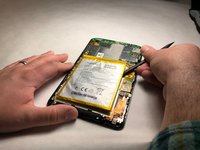
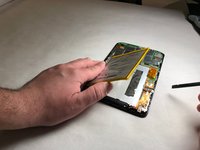
Use precision tweezers to disconnect the battery from the ZIF connector.
-
-


To reassemble your device, follow these instructions in reverse order.
Cancel: I did not complete this guide.
One other person completed this guide.

Team

IUPUI, Team S6-G2, Baechle Spring 2018 Member of IUPUI, Team S6-G2, Baechle Spring 2018
IUPUI-BAECHLE-S18S6G2
3 Members
48 Guides authored
