Free Shipping on Domestic Orders $75+

Alcatel One Touch Idol 3 Battery Replacement

What you need

    1. Alcatel One Touch Idol 3 Battery Replacement, Battery: step 1, image 1 of 3 Alcatel One Touch Idol 3 Battery Replacement, Battery: step 1, image 2 of 3 Alcatel One Touch Idol 3 Battery Replacement, Battery: step 1, image 3 of 3
      • Remove the sim tray by inserting a sim removal tool and then pulling it out.

      Ask FixBot

      Add Comment

    2. Alcatel One Touch Idol 3 Battery Replacement: step 2, image 1 of 3 Alcatel One Touch Idol 3 Battery Replacement: step 2, image 2 of 3 Alcatel One Touch Idol 3 Battery Replacement: step 2, image 3 of 3
      • Remove the back cover by moving around its perimeter with a thin object that can fit.

      • Eventually you will be able to pry open the back cover.

      • Although a razor is depicted, we recommend using ESD-safe pry tools instead.

      Ask FixBot

      Add Comment

    3. Alcatel One Touch Idol 3 Battery Replacement: step 3, image 1 of 2 Alcatel One Touch Idol 3 Battery Replacement: step 3, image 2 of 2
      • Remove the protective sticker from the battery connection.

      Ask FixBot

      Add Comment

    4. Alcatel One Touch Idol 3 Battery Replacement: step 4, image 1 of 2 Alcatel One Touch Idol 3 Battery Replacement: step 4, image 2 of 2
      • Disconnect the battery's connection to the motherboard by lifting it upwards.

      • Although a razor is depicted, we recommend using ESD-safe pry tools instead.

      Ask FixBot

      Add Comment

    5. Alcatel One Touch Idol 3 Battery Replacement: step 5, image 1 of 2 Alcatel One Touch Idol 3 Battery Replacement: step 5, image 2 of 2
      • Add a small amount of isopropyl alcohol around the sides of the battery to soften the adhesive.

      • Take care to not get isopropyl alcohol on any other parts of the phone.

      Ask FixBot

      Add Comment

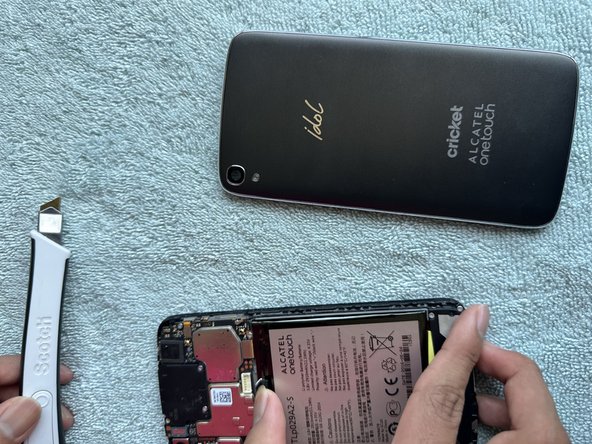
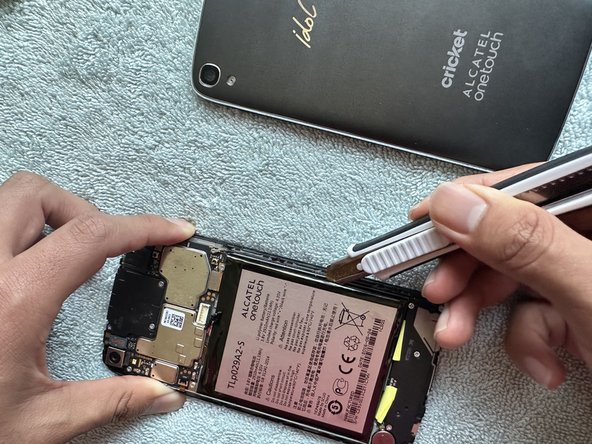
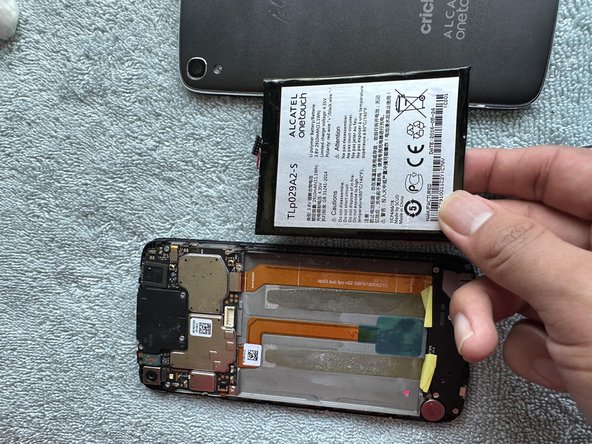
    6. Alcatel One Touch Idol 3 Battery Replacement: step 6, image 1 of 3 Alcatel One Touch Idol 3 Battery Replacement: step 6, image 2 of 3 Alcatel One Touch Idol 3 Battery Replacement: step 6, image 3 of 3
      • Pry out the battery by leveraging an object under the battery and lifting it upwards.

      • Although a razor is depicted, we recommend using ESD-safe pry tools instead. A razor could easily puncture the battery and create a hazard.

      Ask FixBot

      Add Comment

Conclusion

To reassemble your device, follow these instructions in reverse order.

Cancel: I did not complete this guide.

Eric Lopez

Member since: 10/31/23

133 Reputation

1 Guide authored

Team

0 Guide Comments

Add Comment

View Statistics:

Past 24 Hours: 0

Past 7 Days: 10

Past 30 Days: 38

All Time: 561