
Alcatel One Touch Fierce Rear Facing Camera Replacement

Cody Stouffer and 3 other contributors
Last updated on May 7, 2024
Views: 2.8K
View statistics:
- Past 24 Hours:
- 2
- Past 7 Days:
- 23
- Past 30 Days:
- 95
- All Time:
- 2,806
Comments: 0
No one has left comments on this guide. Will you be first?
Go to guide commentsCompleted: 6 7
6 people have marked this guide "completed." Will you be next?
7 people have marked this guide "completed." Including you — great job!
Favorites: 5 6
5 people have favorited (and subscribed to) this guide. Will you be next?
6 people have favorited (and subscribed to) this guide — including you!
Introduction
Go to step 1 ↓Use this guide to replace the rear facing camera on your Alcatel One Touch Fierce.
What you need
Tools


-
-
-
Pry with a plastic opening tool, or your fingernail, in the divot at the bottom left corner of the phone.
-
Lift the rear case by the corner nearest the divot and remove it from the phone.
 Ask FixBot
-
-
-
-
-
-
Tool used on this step:Tweezers$4.99
-
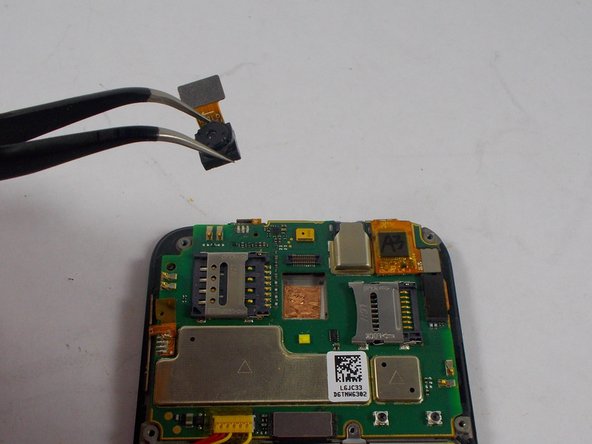
Use a pair of tweezers to gently disconnect the camera connector and remove the rear facing camera.
-
-




To reassemble your device, follow these instructions in reverse order.
Cancel: I did not complete this guide.
6 other people completed this guide.

Team

UMass Dartmouth, Team 5-5, Vijaybhaskar Fall 2014 Member of UMass Dartmouth, Team 5-5, Vijaybhaskar Fall 2014
UMASSD-VIJAYBHASKAR-F14S5G5
3 Members
36 Guides authored
