Introduction
If the rear-facing camera on your Alcatel Lively Jitterbug Smart3 is not working properly – such as persistent blurriness or failing to open at all – you may need to replace the camera module. Before beginning, visit the troubleshooting page to confirm if the issue is hardware-related and not a software glitch or a dirty lens. Power off the device completely before starting. The plastic internal clips are prone to breaking, therefore proceed with caution when prying the rear casing. Use a spudger to gently pry open the camera connector to prevent any physical damage as it is a delicate "press-fit" component.
What you need
-
-
-
Use your fingernail or small pry tool to gently lift around the edges of the phone until the back cover pops off.
 Ask FixBot
-
-
-
Remove the nine 1mm screws using a Phillips #0 screwdriver located on the back frame.
-
-
-
-
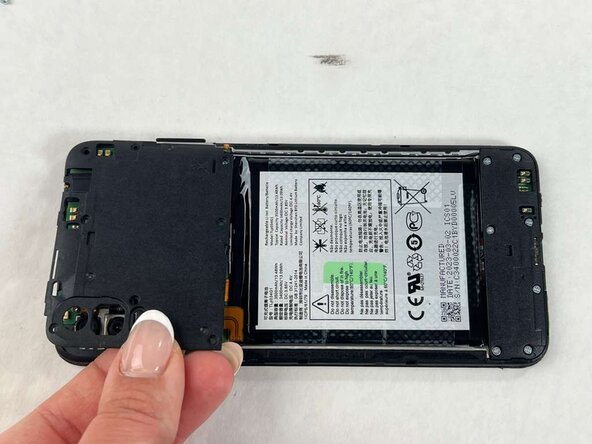
Use the pry tool of fingernail to gently separate the plastic frame from the phone.
-
-
-
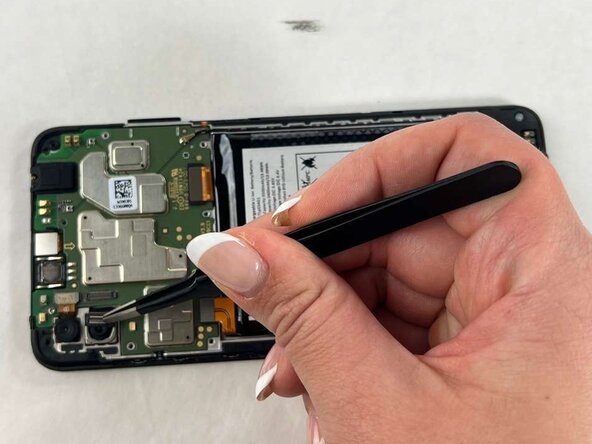
Detach the camera module's cable connector from the motherboard.
-
Carefully lift the camera out of its slot.
-
-








To reassemble your device, follow these instructions in reverse order.

Team

UMass Dartmouth, Team 1-1, Evans Spring 2026 Member of UMass Dartmouth, Team 1-1, Evans Spring 2026
UMASSD-EVANS-S26S1G1
4 Members
36 Guides authored
