
Alcatel Go Flip 4 Motherboard Replacement

Dulcemaria Ramirez and 2 other contributors
Last updated on Dec 19, 2025
Views: 322
View statistics:
- Past 24 Hours:
- 4
- Past 7 Days:
- 13
- Past 30 Days:
- 60
- All Time:
- 322
Comments: 0
No one has left comments on this guide. Will you be first?
Go to guide commentsCompleted: 0 1
No one has marked this guide "completed." Will you be the first?
1 person has marked this guide "completed." It's you — great job!
Favorites: 0 1
No one has favorited (and subscribed to) this guide. Will you be the first?
1 person has favorited (and subscribed to) this guide — and that's you!
Introduction
Go to step 1 ↓Is your Alcatel flip phone often freezing, working really slow, or randomly reseting itself?This guide provides a replacement guide for the motherboard on an Alcatel Go Flip phone 4.
Before replacing the motherboard, check out our troubleshooting page and come back to this replacement guide if you are still having issues.
Before beginning this repair, make sure to power off your phone and have it unplugged from the charger.
What you need
Tools
-
Spudger4.9
-
-


-
-
-
Insert a spudger into the notch on the back cover and gently pry upward until you hear a soft click, indicating the back has begun to separate.
-
Continue prying around the edges until the cover is fully removed.
 Ask FixBot
-
-
-
Insert a spudger into the midframe cutout and pry up to release the battery.
-
Remove the battery.
-
-
-
-
-
Use a JIS #00 screwdriver to remove all nine 4.4 mm screws that secure the midframe.
-
-
-
-
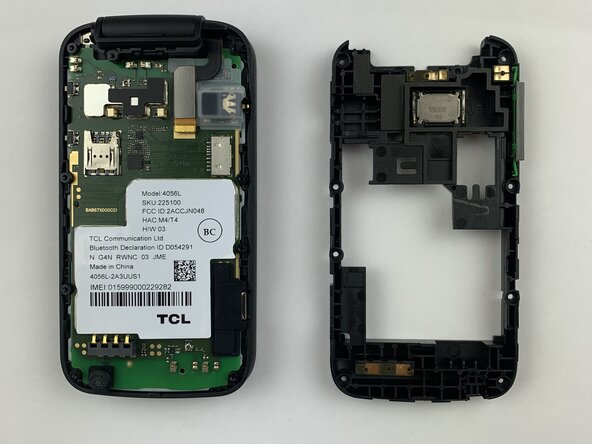
Run the spudger under the midframe to pry it away from the rest of the phone.
-
Set the midframe aside.
-
-
-
Pry up the motherboard with the spudger.
-
Run the spudger along the perimeter of the motherboard.
-
Remove the motherboard from the phone.
-
-





To reassemble your device, follow these instructions in reverse order.

Team

Texas Tech, Team 2-2, Johansen Fall 2025 Member of Texas Tech, Team 2-2, Johansen Fall 2025
TTU-JOHANSEN-F25S2G2
5 Members
60 Guides authored
