
Alcatel Fierce 4 Display Replacement

Mckenzie Dalley and
Last updated on Jan 5, 2021
Views: 744
View statistics:
- Past 24 Hours:
- 3
- Past 7 Days:
- 13
- Past 30 Days:
- 57
- All Time:
- 744
Comments: 1
1 comment on steps.
Completed: 0 1
No one has marked this guide "completed." Will you be the first?
1 person has marked this guide "completed." It's you — great job!
Favorites: 0 1
No one has favorited (and subscribed to) this guide. Will you be the first?
1 person has favorited (and subscribed to) this guide — and that's you!
Needs More Images
A few more images would make this guide's procedures crystal clear.
Missing Steps
Oops! This guide is currently missing one or more important steps.
What you need
Tools
-
-
Spudger4.9


Introduction
Go to step 1 ↓This guide will show you how to replace the display of an Alcatel Fierce 4 phone.
A display replacement could be helpful if your screen is cracked or not working properly. Common problems that could mean that a display replacement is necessary is flickering, blank screen and unresponsiveness from touch input.
Before you replace your display it's recommended that you make sure to rule out other problems. A screen will not turn on if the phone has a battery issue in which it will not hold a charge. To make sure this isn't a battery issue plug your phone to a wall outlet and verify that the screen still does not turn on or remains unresponsive. A detailed troubleshooting guide can also be found at (Alcatel Fierce 4 Troubleshooting).
Be aware that replacing the display is moderately difficult and it should only be done while the phone is powered off. The connections from the screen to the phones motherboard are very delicate, disconnect cables with caution as you could further damage the phone if not careful.
-
-
-
Pry off the mid-frame using a plastic opening tool, working your way around the perimeter.
-
-
-
-
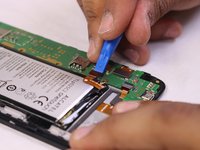
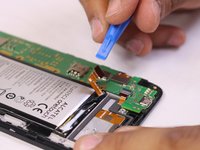
Use a plastic opening tool to disconnect all of the cables on the motherboard.
-
Use a spudger to flip up the retaining flap on the ribbon cable ZIF sockets.
-
-

 Ask FixBot




To reassemble your device, follow these instructions in reverse order.

Team

Idaho State University, Team S1-G1, Watkins Fall 2019 Member of Idaho State University, Team S1-G1, Watkins Fall 2019
ISU-WATKINS-F19S1G1
3 Members
12 Guides authored
