
Alarmo CMOS Battery Replacement

Dante and one other contributor
Last updated on Jul 7, 2026
Views: 456
View statistics:
- Past 24 Hours:
- 3
- Past 7 Days:
- 25
- Past 30 Days:
- 130
- All Time:
- 456
Comments: 0
No one has left comments on this guide. Will you be first?
Go to guide commentsCompleted: 1 2
1 person has marked this guide "completed." Will you be next?
2 people have marked this guide "completed." Including you — great job!
Favorites: 0 1
No one has favorited (and subscribed to) this guide. Will you be the first?
1 person has favorited (and subscribed to) this guide — and that's you!
Community-Contributed Guide
An awesome member of our community made this guide. It was not created by iFixit staff.
Introduction
Go to step 1 ↓If your alarmo is no longer saving date and time when it loses power, it's probably the CMOS battery. This guide will instruct you on how to swap it.
What you need
Parts

Tools
-
Tri-point Y00 Screwdriver Bit$2.995
Any other tri-point screw driver MIGHT work, but I wouldn't recommend it.


-
-
-
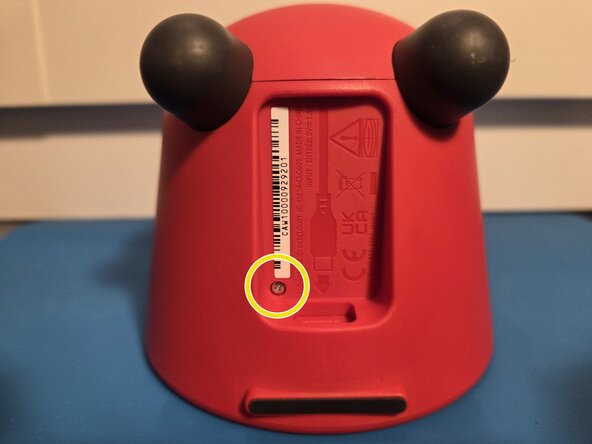
Flip your Alarmo so you can see the USB-C port.
-
Use a tri-point Y00 driver to remove the silver screw just below the S/N sticker.
 Ask FixBot
-
-
-
Turn the Alarmo's Frontplate counter-clockwise until it pops out.
-
-
-
Use a Philips #00 driver to remove the silver screws in the CMOS bracket and cover.
-
-
-
Remove the battery cover, flip the bracket upside down, and the battery will come off.
-
-
-
Insert your new battery with the positive side facing up.
-
-
-
Use a Philips #00 driver to rescrew the two silver screws that hold the CMOS bracket.
-
-
-
Use a Philips #00 driver to rescrew the silver screw that hold the CMOS cover.
-
-
-
-
Snap the front plate with the back of the alarmo.
-
Align the charging port with the charging port hole.
-
-
-
Use a tri-point Y00 driver to screw the silver screw just below the S/N sticker.
-
-


You swapped the battery! No more steps required.
When you power on the alarmo, the clock will be set at 1AM at 01/01. It will be adjusted automatically after a few seconds if you have an internet connection set up. If you don't have an internet connection or it doesn't adjust after a minute, you can adjust the Time and Date at settings -> Date and Time.
Please throw your old battery in a battery collection point.
Cancel: I did not complete this guide.
One other person completed this guide.

