
AirTag Battery Replacement

Kyle Smith and 2 other contributors
Last updated on Apr 5, 2024
Views: 76K
View statistics:
- Past 24 Hours:
- 34
- Past 7 Days:
- 192
- Past 30 Days:
- 844
- All Time:
- 76,345
Comments: 9
3 comments on steps, 6 guide comments.
Go to guide commentsCompleted: 28 29
28 people have marked this guide "completed." Will you be next?
29 people have marked this guide "completed." Including you — great job!
Favorites: 1 2
1 person has favorited (and subscribed to) this guide. Will you be next?
2 people have favorited (and subscribed to) this guide — including you!
Featured Guide
This guide has been found to be exceptionally cool by the iFixit staff.
Introduction
Go to step 1 ↓Follow this guide to replace the battery in your Apple AirTag.
AirTags use one CR2032 coin cell battery.
What you need
Parts

-
-
-
Use both of your thumbs to push down on the battery compartment door.
 Ask FixBot
-
-
-
Rotate the battery compartment door counter-clockwise to unlatch it from the frame.
-
-
-
Lift up the battery compartment door to remove it.
-
-
-


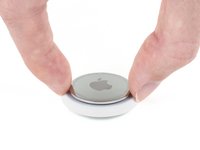
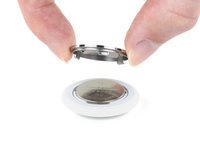


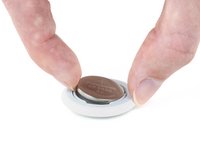
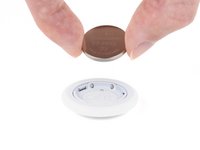
To reassemble your device, follow these instructions in reverse order.
Cancel: I did not complete this guide.
28 other people completed this guide.

6 Guide Comments
Bjr. Plus d’un an après l’achat de l’AirTag, impossible de l’ouvrir. Quand je presse avec 2 doigts, il ne se passe rien (le couvercle ne s’enfonce pas). Et le couvercle a l’air bloqué (grippé). J’hésite à utiliser une pince pour le tourner. Mon AirTag est resté depuis son achat dans une poche étanche de mon sac à dos. Il ne sonne plus quand je déplace ce dernier mais sonne si je le localise. Cdlt.
Eugénie, excusez mon français. Essayez de saisir l'AirTag des deux côtés avec quelque chose qui a de l'adhérence, comme du silicone. Appuyez ensuite vers le bas et tournez. Assurez-vous de tourner dans le bon sens. Bonne chance!
Well done! One thing to add is that the replacement battery must not have a bitterant coating as they are problematic with the AirTags.
Removing the bitterant with some isopropyl (rubbing) alcohol works if you aren’t able to find unflavored batteries near by.
