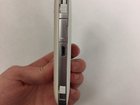
AirCard 770S SIM Card Replacement

Caitlin Little and 3 other contributors
Last updated on Jan 3, 2019
Views: 2.4K
View statistics:
- Past 24 Hours:
- 2
- Past 7 Days:
- 10
- Past 30 Days:
- 66
- All Time:
- 2,430
Comments: 0
No one has left comments on this guide. Will you be first?
Go to guide commentsCompleted: 0 1
No one has marked this guide "completed." Will you be the first?
1 person has marked this guide "completed." It's you — great job!
Favorites: 0 1
No one has favorited (and subscribed to) this guide. Will you be the first?
1 person has favorited (and subscribed to) this guide — and that's you!
Introduction
Go to step 1 ↓This guide is designed to help you replace your SIM Card in the device. In order to replace your SIM Card you must have a new SIM Card or are simply learning how to properly insert a SIM Card. Make sure your SIM Card is the correct size to fit into the area in your device.
-
-
-
Look to the left of the charging port and peel back the SIM Card slot in order to open it.
-
-
-
If there is already a SIM Card in the slot, use your finger to press in the SIM Card so that it will pop out slightly. If it does not pop out the first time, press it in again.
-
-

 Ask FixBot


To reassemble your device, follow these instructions in reverse order.

Team

Marist, Team S1-G2, Chaterdon Fall 2018 Member of Marist, Team S1-G2, Chaterdon Fall 2018
MARS-CHATERDON-F18S1G2
3 Members
36 Guides authored
