
Afterglow Wireless PS3 Controller Joystick Replacement

Aj Coello and 2 other contributors
Last updated on May 22, 2017
Views: 6K
View statistics:
- Past 24 Hours:
- 4
- Past 7 Days:
- 26
- Past 30 Days:
- 134
- All Time:
- 6,003
Comments: 1
1 comment on steps.
Completed: 12 13
12 people have marked this guide "completed." Will you be next?
13 people have marked this guide "completed." Including you — great job!
Favorites: 1 2
1 person has favorited (and subscribed to) this guide. Will you be next?
2 people have favorited (and subscribed to) this guide — including you!
Featured Student Guide
This guide has been the hard work of our awesome students and is found to be exceptionally cool by the iFixit staff.
Introduction
Go to step 1 ↓In order to replace the joysticks for the Afterglow Wireless PS3 Controller the back plate must be removed and the joystick boards must be unscrewed.
What you need
Tools

-
-
-
Lay the controller face down on a flat surface and remove the seven 9mm Phillips #0 screws on the back of the controller.
-
Lift up and remove the controller back plate.
 Ask FixBot
-
-
-
-
-
Carefully remove the battery by lifting it straight up from its place.
-
-
-
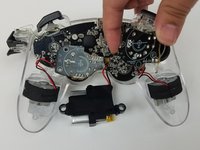
Unscrew the four 9mm Phillips #0 screws that are attached to both joy stick control mini-motherboards. There are two screws for each mini-motherboard.
-
-
-
-
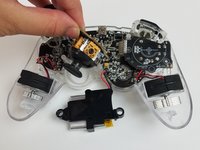
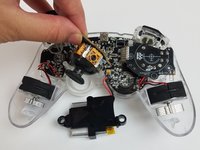
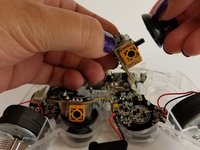
Firmly grip the joystick housing with your forefingers by the yellow squares.
-
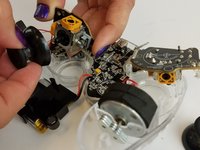
Use your other hand to get a grip on the black plastic joystick and pull directly away from the housing.
-
-




To reassemble your device, follow these instructions in reverse order.
Cancel: I did not complete this guide.
12 other people completed this guide.

Team

USF Tampa, Team S19-G5, Hoffman Spring 2017 Member of USF Tampa, Team S19-G5, Hoffman Spring 2017
USFT-HOFFMAN-S17S19G5
4 Members
96 Guides authored
