Introduction
This RAM replacement guide will teach you the process of replacing/upgrading the RAM in Acer Nitro 5 AN515-54 (Intel), which has 2 RAM slots and supports up to a maximum of 32GB. RAM is an important component of your laptop that directly affects its speed and overall performance. If your laptop feels slow, freezes during heavy tasks, or struggles to run multiple programs simultaneously, upgrading your RAM is one of the fastest and cost-effective fixes you can do to solve your issue.
Before you start, you can find details about compatible RAM for your Acer Nitro 5 AN515-54 on the Crucial website to ensure you choose the correct RAM upgrade and shut off the laptop, unplug the charger, and all external power sources, and avoid working on the carpet, as it can build up static electricity, which may damage internal components.
What you need
-
-
-
Use a Phillips #0 screwdriver to remove the eleven 6.0 mm screws from the bottom case.
 Ask FixBot
-
-
-
Place a plastic opening tool between the back cover and the frame and slide it slowly around the edge of the laptop to release the clips holding it together.
-
-
-
Use the wide end of a spudger to carefully push on the battery connector tab to slide it out of its socket on the motherboard.
-
-
-
-
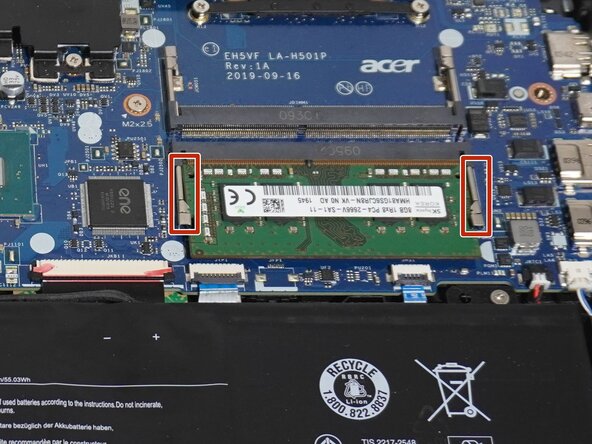
Gently push the silver retention clips away from the RAM stick to release it.
-
Grab it by the edges and carefully slide it out of the slot.
-
-
-
Match the notch on the new RAM module to the ridge in the slot, then slide the RAM into the slot at a 45° angle.
-
Press it down until both side clips snap and lock the RAM into place.
-
-
-
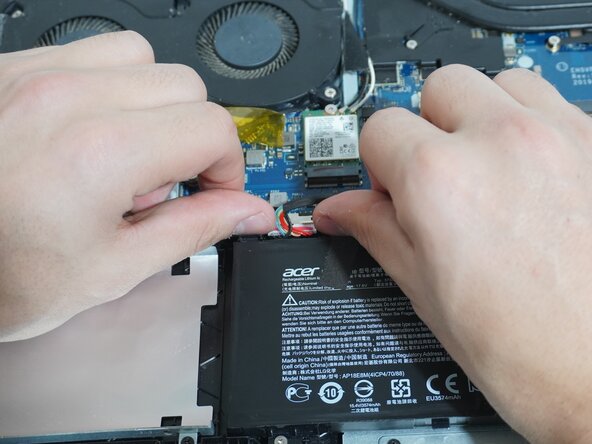
Align the battery connector with the socket on the motherboard and gently slide it into place until it is fully seated.
-
-
-
Place the bottom cover back onto the laptop and press down along the edges to click it back into place.
-
Replace the eleven Phillips #00 screws that secure the bottom case.
-
-





When turning on your laptop for the first time after installing new RAM, it may take a few minutes for it to boot up as the system recognizes the memory. Once it boots up, your Acer Nitro 5 AN515-54 (Intel) should run smoother and overall perform better.
Take your e-waste to an R2 or e-Stewards certified recycler.
Cancel: I did not complete this guide.
One other person completed this guide.

Team

York University, Team 1-3, Woodhouse Winter 2026 Member of York University, Team 1-3, Woodhouse Winter 2026
YORK-WOODHOUSE-W26S1G3
2 Members
12 Guides authored
