Free Shipping on Domestic Orders $75+

Acer Iconia A1-810 Battery Replacement

What you need

  1. Acer Iconia A1-810 Battery Replacement, Battery: step 1, image 1 of 1
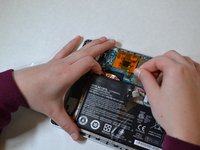
    • Remove the back cover by lifting with a plastic opening tool, below the camera button slot.

    Ask FixBot

    Add Comment

  2. Acer Iconia A1-810 Battery Replacement: step 2, image 1 of 1
    • Remove the black tape connecting the battery to the motherboard.

    Ask FixBot

    Add Comment

  3. Acer Iconia A1-810 Battery Replacement: step 3, image 1 of 1
    • Pinch the sides of the white resistor to safely remove it without damaging it or yourself.

    Ask FixBot

    Add Comment

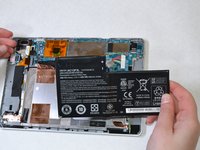
  4. Acer Iconia A1-810 Battery Replacement: step 4, image 1 of 2 Acer Iconia A1-810 Battery Replacement: step 4, image 2 of 2
    • Remove battery from adhesive.

    Ask FixBot

    Add Comment

Conclusion

To reassemble your device, follow these instructions in reverse order.

Cancel: I did not complete this guide.

9 other people completed this guide.

John

Member since: 01/29/15

635 Reputation

3 Guides authored

Team

UWT Liner: Group 3 Member of UWT Liner: Group 3

Community

5 Members

3 Guides authored

0 Guide Comments

Add Comment

View Statistics:

Past 24 Hours: 2

Past 7 Days: 14

Past 30 Days: 47

All Time: 14,480