Free Shipping on Domestic Orders $75+

Acer Aspire a515-46 SSD Replacement

What you need

    1. Acer Aspire a515-46 SSD Replacement, Turn off: step 1, image 1 of 1
      • If laptop is not already off, hold power button for 5 seconds until screen shuts off.

      • If needed, backup any files to a USB or an external hard drive before turning off and replacing SSD.

      Ask FixBot

      Add Comment

    2. Acer Aspire a515-46 SSD Replacement, Remove Back Panel 1 of 3: step 2, image 1 of 1
      • Flip the laptop over and locate the screws on the back panel.

      Ask FixBot

      Add Comment

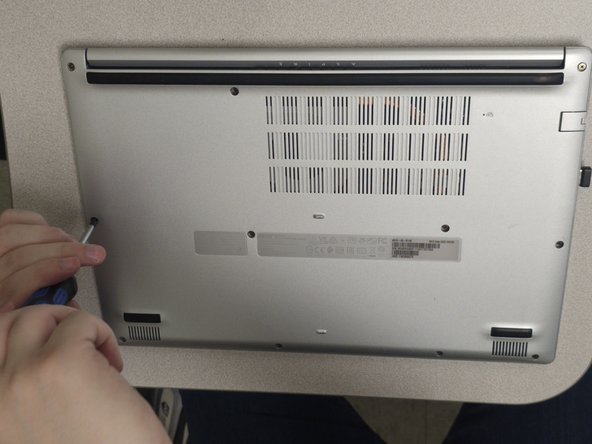
    3. Acer Aspire a515-46 SSD Replacement, Remove Back Panel 2 of 3: step 3, image 1 of 3 Acer Aspire a515-46 SSD Replacement, Remove Back Panel 2 of 3: step 3, image 2 of 3 Acer Aspire a515-46 SSD Replacement, Remove Back Panel 2 of 3: step 3, image 3 of 3
      • Using a Philips head screwdriver, remove all of the screws on the back panel.

      Ask FixBot

      Add Comment

    4. Acer Aspire a515-46 SSD Replacement, Remove Back Panel 3 of 3: step 4, image 1 of 3 Acer Aspire a515-46 SSD Replacement, Remove Back Panel 3 of 3: step 4, image 2 of 3 Acer Aspire a515-46 SSD Replacement, Remove Back Panel 3 of 3: step 4, image 3 of 3
      • Use a small screwdriver or prybar to pry the back panel away from the laptop.

      Ask FixBot

      Add Comment

    5. Acer Aspire a515-46 SSD Replacement, Remove Battery 1 of 3: step 5, image 1 of 2 Acer Aspire a515-46 SSD Replacement, Remove Battery 1 of 3: step 5, image 2 of 2
      • Remove the two pieces of tape holding the battery connector and wires.

      Ask FixBot

      Add Comment

    6. Acer Aspire a515-46 SSD Replacement, Remove Battery 2 of 3: step 6, image 1 of 3 Acer Aspire a515-46 SSD Replacement, Remove Battery 2 of 3: step 6, image 2 of 3 Acer Aspire a515-46 SSD Replacement, Remove Battery 2 of 3: step 6, image 3 of 3
      • Using your fingernails, pinch the battery connector on both sides and pull it straight back until it is removed from the socket.

      Ask FixBot

      Add Comment

    7. Acer Aspire a515-46 SSD Replacement, Remove Battery 3 of 3: step 7, image 1 of 2 Acer Aspire a515-46 SSD Replacement, Remove Battery 3 of 3: step 7, image 2 of 2
      • Pull up and remove the battery from the compartment.

      Ask FixBot

      Add Comment

    8. Acer Aspire a515-46 SSD Replacement, Replace SSD 1 of 3: step 8, image 1 of 2 Acer Aspire a515-46 SSD Replacement, Replace SSD 1 of 3: step 8, image 2 of 2
      • Use a small Philips head screwdriver to remove the screw holding the bottom of the SSD.

      Ask FixBot

      Add Comment

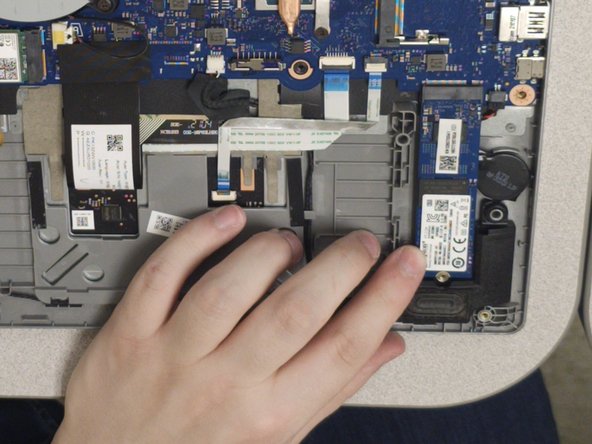
    9. Acer Aspire a515-46 SSD Replacement, Replace SSD 2 of 3: step 9, image 1 of 2 Acer Aspire a515-46 SSD Replacement, Replace SSD 2 of 3: step 9, image 2 of 2
      • Pull the SSD straight back until it is removed from the socket.

      Ask FixBot

      Add Comment

    10. Acer Aspire a515-46 SSD Replacement, Replace SSD 3 of 3: step 10, image 1 of 2 Acer Aspire a515-46 SSD Replacement, Replace SSD 3 of 3: step 10, image 2 of 2
      • Insert the new SSD into the socket, making sure that the notch is on the right side of the SSD.

      Ask FixBot

      Add Comment

Conclusion

To reassemble your device, follow these instructions in reverse order.

Cancel: I did not complete this guide.

One other person completed this guide.

Am Persand

Member since: 04/11/23

211 Reputation

1 Guide authored

0 Guide Comments

Add Comment

View Statistics:

Past 24 Hours: 2

Past 7 Days: 5

Past 30 Days: 27

All Time: 740