
Acer Aspire V3-571G RAM Replacement

Erica Gomes and 3 other contributors
Last updated on Jun 6, 2018
Views: 2.1K
View statistics:
- Past 24 Hours:
- 1
- Past 7 Days:
- 27
- Past 30 Days:
- 100
- All Time:
- 2,097
Comments: 0
No one has left comments on this guide. Will you be first?
Go to guide commentsCompleted: 2 3
2 people have marked this guide "completed." Will you be next?
3 people have marked this guide "completed." Including you — great job!
Favorites: 1 2
1 person has favorited (and subscribed to) this guide. Will you be next?
2 people have favorited (and subscribed to) this guide — including you!
Better Introduction
Improve this guide by completing or revising its introduction.
What you need
Tools


-
-
-
Flipping your laptop over, the RAM is located on the lower half of the laptop
-
Remove the two screws shown on diagram using a Phillips #00 screwdriver
-
Use the opening tool to help lift and remove the lower case
 Ask FixBot
-
-
-
-
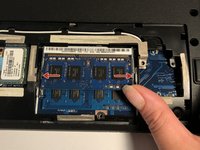
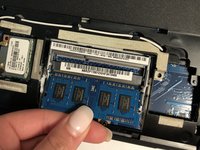
After removing the screw, push the tabs on the sides of the cards out. This will allow the RAM card to pop up so you can carefully pull it out. Repeat this for the second RAM card under it.
-
-


To reassemble your device, follow these instructions in reverse order.
Cancel: I did not complete this guide.
2 other people completed this guide.

Team

UMass Dartmouth, Team S4-G6, Covino Spring 2018 Member of UMass Dartmouth, Team S4-G6, Covino Spring 2018
UMASSD-COVINO-S18S4G6
3 Members
60 Guides authored
