Free Shipping on Domestic Orders $75+

Acer Aspire S3 MS2346 Keyboard Replacement

What you need

    1. Acer Aspire S3 MS2346 Keyboard Replacement, Back Cover: step 1, image 1 of 3 Acer Aspire S3 MS2346 Keyboard Replacement, Back Cover: step 1, image 2 of 3 Acer Aspire S3 MS2346 Keyboard Replacement, Back Cover: step 1, image 3 of 3
      • Remove the 12 5mm Phillips #00 screws.

      • Use a plastic opening tool to gently pry open the back panel.

      • Gently lift up the back panel, exposing the internals of the laptop.

      Ask FixBot

      Add Comment

    1. Acer Aspire S3 MS2346 Keyboard Replacement, Motherboard: step 2, image 1 of 3 Acer Aspire S3 MS2346 Keyboard Replacement, Motherboard: step 2, image 2 of 3 Acer Aspire S3 MS2346 Keyboard Replacement, Motherboard: step 2, image 3 of 3
      • Remove the motherboard connector cables by gently lifting the black latch that clamps them in place with a spudger or simply pull the connector from the port.

      Ask FixBot

      Add Comment

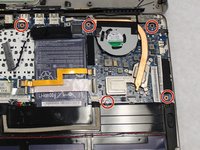
    2. Acer Aspire S3 MS2346 Keyboard Replacement: step 3, image 1 of 2 Acer Aspire S3 MS2346 Keyboard Replacement: step 3, image 2 of 2
      • Remove the 5 5mm PH0 screws holding the motherboard in place.

      • Gently remove the motherboard from the chassis.

      Ask FixBot

      Add Comment

    3. Acer Aspire S3 MS2346 Keyboard Replacement: step 4, image 1 of 1
      • Gently remove the motherboard.

      Ask FixBot

      Add Comment

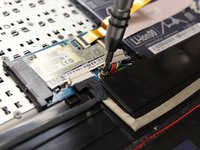
    1. Acer Aspire S3 MS2346 Keyboard Replacement, Speakers: step 5, image 1 of 2 Acer Aspire S3 MS2346 Keyboard Replacement, Speakers: step 5, image 2 of 2
      • Unscrew the 4 1mm PH00 screws attaching the speakers to the frame.

      Ask FixBot

      Add Comment

    2. Acer Aspire S3 MS2346 Keyboard Replacement: step 6, image 1 of 1
      • Gently remove the speakers. Note that the wire connecting them may be lightly glued down. If so, gently pry up.

      Ask FixBot

      Add Comment

    1. Acer Aspire S3 MS2346 Keyboard Replacement, Battery: step 7, image 1 of 1
      • Gently lift the battery from the frame.

      Ask FixBot

      Add Comment

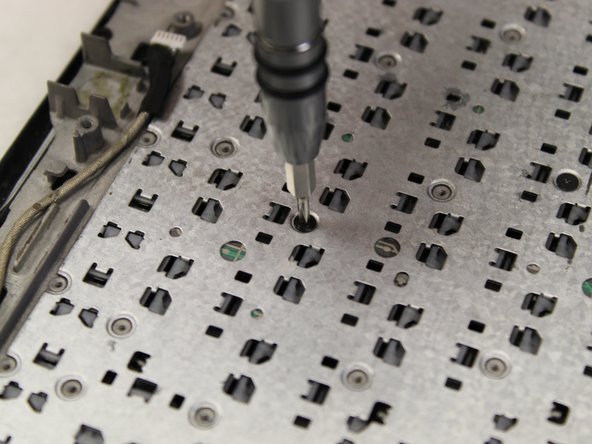
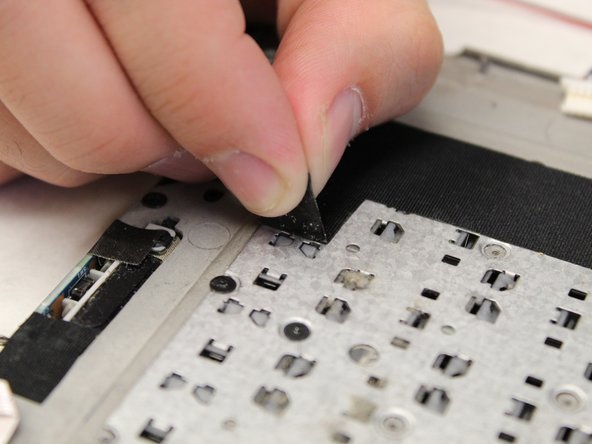
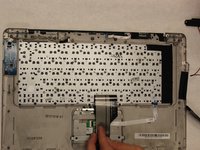
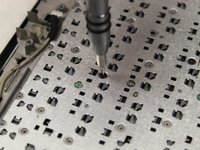
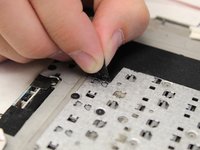
    1. Acer Aspire S3 MS2346 Keyboard Replacement, Keyboard: step 8, image 1 of 3 Acer Aspire S3 MS2346 Keyboard Replacement, Keyboard: step 8, image 2 of 3 Acer Aspire S3 MS2346 Keyboard Replacement, Keyboard: step 8, image 3 of 3
      • The 30 1mm PH000 screws holding the keyboard in place will be distributed all over the back.

      • You will need to gently pry up the black tape to expose the remaining screws.

      Ask FixBot

      Add Comment

    2. Acer Aspire S3 MS2346 Keyboard Replacement: step 9, image 1 of 1
      • Gently lift the board exposing the keyboard assembly.

      Ask FixBot

      Add Comment

Conclusion

To reassemble your device, follow these instructions in reverse order.

Cancel: I did not complete this guide.

One other person completed this guide.

Nikolas I Steckley

Member since: 09/17/18

690 Reputation

5 Guides authored

Team

0 Guide Comments

Add Comment

View Statistics:

Past 24 Hours: 2

Past 7 Days: 7

Past 30 Days: 43

All Time: 2,055