Introduction
In this guide, you will learn how to replace the Wi-Fi card on the Acer Inspire R7 laptop (R7-371T-78GX).
A Wi-Fi card is used to receive wireless signals from your wireless network. Over time the Wi-Fi card can fail or be upgraded for a stronger card. Review the iFixit page on the Acer Aspire R7 for more details on Wi-Fi card issues.
When starting this project, make sure to power off your laptop and unplug from the power adapter. Overlooking this detail can cause damage to hardware.
What you need
-
-
-
Shut down the laptop and disconnect the power cord.
-
Turn the laptop over.
 Ask FixBot
-
-
-
Remove six 6mm T7 screws.
-
Remove four 4mm T7 screws.
-
Remove two 10mm T7 screws
-
Use the blue plastic opening tool to carefully remove both rubber pads which cover the four remaining screws.
-
Remove the remaining two10mm T7 screws.
-
-
-
-
-
-
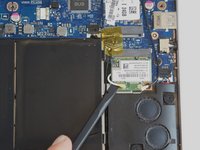
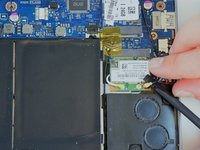
Locate the WiFi Card antenna wires
-
Remove both antenna wires from the WiFi card by prying upwards with the spudger tool
-
-




To reassemble your device, follow these instructions in reverse order.
Cancel: I did not complete this guide.
2 other people completed this guide.

Team

USF Tampa, Team 3-4, Hickman Winter 2015 Member of USF Tampa, Team 3-4, Hickman Winter 2015
USFT-HICKMAN-W15S3G4
4 Members
72 Guides authored
2 Guide Comments
This answer might be useful for others who still want to update their Wifi card in their R7-572.
I just replaced the original Broadcom BCM943228HMB on my R7-572 with an Intel 7260HMW CN: 08TF1D (Standard half-height mini PCI-e interface card ). I found it on ebay:https://www.ebay.ca/itm/4-0-Wireless-Min... (19 USD as of October 2018)
After the card is installed, run Intel Driver & Support Assistant and my driver where updated to the latest ones (for both the AC 7260 and the Bluetooth adapter). http://www.intel.com/content/www/us/en/s...
I am using Windows 8.1 on this laptop.
HTH
