Free Shipping on Domestic Orders $75+

Acer Aspire One ZG5 Top Case Replacement

What you need

  1. Acer Aspire One ZG5 Top Case Replacement, Battery: step 1, image 1 of 1
    • Turn the netbook upside down with the battery at the top, facing away from you.

    Ask FixBot

    Add Comment

  2. Acer Aspire One ZG5 Top Case Replacement: step 2, image 1 of 1
    • Unlock the battery by sliding the switch located near the left hinge to the left "unlocked" position.

    Ask FixBot

    Add Comment

  3. Acer Aspire One ZG5 Top Case Replacement: step 3, image 1 of 1
    • Slide the latch located on the opposite hinge from the lock while pushing the battery up.

    Ask FixBot

    Add Comment

  4. Acer Aspire One ZG5 Top Case Replacement, Wireless Card: step 4, image 1 of 1
    • Gently loosen the two Phillips #0 screws in the small panel that covers the wireless card.

    • These screws are built into the panel and aren't meant to be completely removed.

    Ask FixBot

    Add Comment

  5. Acer Aspire One ZG5 Top Case Replacement: step 5, image 1 of 1
    • Lift up the panel and remove it from the case.

    Ask FixBot

    Add Comment

  6. Acer Aspire One ZG5 Top Case Replacement: step 6, image 1 of 1
    • Disconnect the two antenna cables from the left side of the wireless card.

    Ask FixBot

    Add Comment

  7. Acer Aspire One ZG5 Top Case Replacement: step 7, image 1 of 1
    • Remove the single 3.9 mm Phillips #1 screw from the bottom left of the wireless card.

    Ask FixBot

    Add Comment

  8. Acer Aspire One ZG5 Top Case Replacement: step 8, image 1 of 1
    • Gently lift up the left side of the wireless card and slide the card out of its socket.

    Ask FixBot

    Add Comment

  9. Acer Aspire One ZG5 Top Case Replacement, Keyboard: step 9, image 1 of 1
    • Turn the netbook over and open the display so that the keyboard is facing you.

    Ask FixBot

    Add Comment

  10. Acer Aspire One ZG5 Top Case Replacement: step 10, image 1 of 3 Acer Aspire One ZG5 Top Case Replacement: step 10, image 2 of 3 Acer Aspire One ZG5 Top Case Replacement: step 10, image 3 of 3
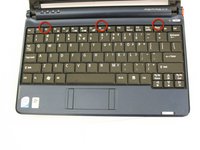
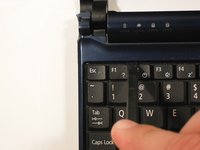
    • There are three tabs located on the top of the keyboard.

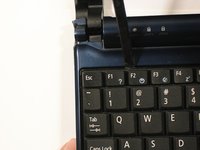
    • Start with the spudger pointing towards the display and pry up to push each tab off the keyboard.

    • As you move to the next tab, ensure the previous tab doesn't reset itself.

    Ask FixBot

    Add Comment

  11. Acer Aspire One ZG5 Top Case Replacement: step 11, image 1 of 2 Acer Aspire One ZG5 Top Case Replacement: step 11, image 2 of 2
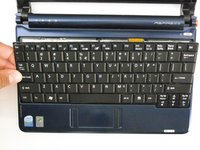
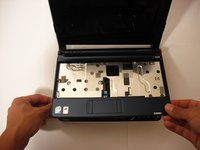
    • Lift top of keyboard up. If it doesn't lift easily, there may be tabs on the sides - use the tool to ease them aside and/or shift the keyboard from side to side.
    • There is a short ribbon cable connecting the keyboard to the netbook.

    Ask FixBot

    Add Comment

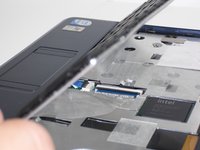
  12. Acer Aspire One ZG5 Top Case Replacement: step 12, image 1 of 2 Acer Aspire One ZG5 Top Case Replacement: step 12, image 2 of 2
    • Disconnect the ribbon by lifting the black plastic hinge and removing the clear blue cable.

    Ask FixBot

    Add Comment

  13. Acer Aspire One ZG5 Top Case Replacement, Top Case: step 13, image 1 of 1
    • Close the display and turn the ZG5 over so that the battery compartment faces away from you.

    Ask FixBot

    Add Comment

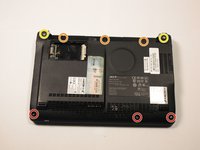
  14. Acer Aspire One ZG5 Top Case Replacement: step 14, image 1 of 2 Acer Aspire One ZG5 Top Case Replacement: step 14, image 2 of 2
    • Remove three 5.8 mm Phillips #0 screws from the bottom of the case

    • Remove three 3.9 mm Phillips #1 screws from the battery compartment.

    • Remove two 5.8 mm Phillips #0 screws from underneath the feet near the hinges.

    Ask FixBot

    Add Comment

  15. Acer Aspire One ZG5 Top Case Replacement: step 15, image 1 of 1
    • Turn the netbook back over and open the display with the keyboard cavity facing you.

    Ask FixBot

    Add Comment

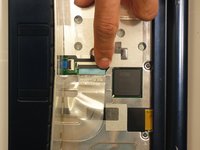
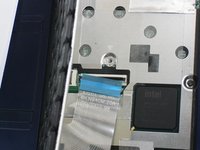
  16. Acer Aspire One ZG5 Top Case Replacement: step 16, image 1 of 3 Acer Aspire One ZG5 Top Case Replacement: step 16, image 2 of 3 Acer Aspire One ZG5 Top Case Replacement: step 16, image 3 of 3
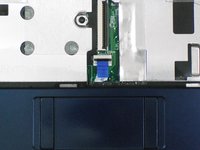
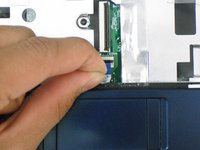
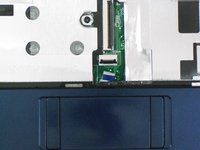
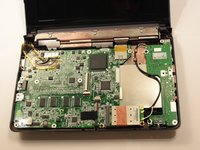
    • Flip up the retaining flap on the trackpad ribbon cable ZIF connector.

    • Using the blue tab, pull the trackpad ribbon cable from its socket on the motherboard.

    Ask FixBot

    Add Comment

  17. Acer Aspire One ZG5 Top Case Replacement: step 17, image 1 of 2 Acer Aspire One ZG5 Top Case Replacement: step 17, image 2 of 2
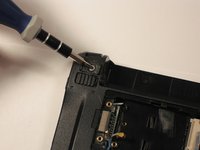
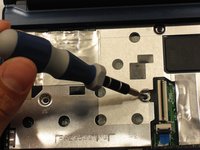
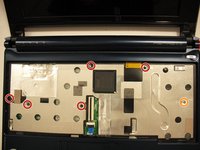
    • Remove the five black 4.7 mm Phillips #0 screws from the metal casing.

    • Remove the single silver 4.3 mm Phillips #00 screw from the right side of the metal casing.

    Ask FixBot

    Add Comment

  18. Acer Aspire One ZG5 Top Case Replacement: step 18, image 1 of 2 Acer Aspire One ZG5 Top Case Replacement: step 18, image 2 of 2
    • Starting at the red rings along the hinge, insert a spudger or plastic opening tool into the seam between the two halves of the case.

    • Slide the spudger toward the front of the device, releasing the small clips that hold down the top case.

    • Gently lift off the top case.

    Ask FixBot

    Add Comment

Conclusion

To reassemble your device, follow these instructions in reverse order.

Cancel: I did not complete this guide.

6 other people completed this guide.

Doug Gallatin

Member since: 10/05/10

6,385 Reputation

10 Guides authored

Team

Cal Poly, Team 7-49, Amido Fall 2010 Member of Cal Poly, Team 7-49, Amido Fall 2010

CPSU-AMIDO-F10S7G49

5 Members

34 Guides authored

0 Guide Comments

Add Comment

View Statistics:

Past 24 Hours: 1

Past 7 Days: 11

Past 30 Days: 49

All Time: 16,607