Introduction
It’s recommended to change Acer Aspire One 722 batteries after approximately one year of use. Normally a fully charged Acer Aspire One 722 battery will support the system for 7 hours, but as the batteries’ lifetime goes down it needs to charge frequently. Take this precaution, if your battery gets swollen. But it’s better to replace the battery before it gets swollen.
Use this simple guide to replace your Acer Aspire One 722 battery. Follow these 5 easy steps which will take no longer than 3 minutes and restore your Acer laptop to like-new performance.
-
-
Power down the netbook by pressing the power button on the top left corner.
 Ask FixBot
-
-
-
-
Slide the button below the battery to the right while simultaneously pulling the battery out.
-


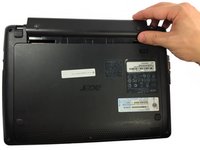
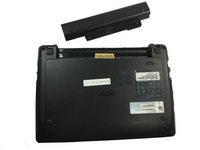

To reassemble your device, follow these instructions in reverse order.
Cancel: I did not complete this guide.
12 other people completed this guide.

Team

UMass Dartmouth, Team 5-6, Gulbrandsen Fall 2015 Member of UMass Dartmouth, Team 5-6, Gulbrandsen Fall 2015
UMASSD-GULBRANDSEN-F15S5G6
3 Members
10 Guides authored
4 Guide Comments
First rate easy to understand completed in less than a minute.many thanks
Thank you, you are a hero of 2021.
Thank you. Simple, yes, but a little encouragement always helps.
