Introduction
Think your laptop could be running faster? Chances are you would be correct and replacing/upgrading the RAM could solve a wide range of issues.
You can upgrade your Acer Aspire M5-583P Laptop up to 8 GB of Random Access Memory! You may want to upgrade to increase speed in order to use Operating Systems, programing languages, or FPS (gaming). This guide will explain how to safely replace the Acer Aspire M5-583P-6423 RAM. It is highly recommended to purchase the 8 GB RAM for to see real performance improvements.
Warning: It’s possible that the Acer Aspire M5-583P-6423 won’t start (presenting a black screen) because of insufficient RAM memory available for its operating system (OS).
1) Re-seat the RAM(s) stick(s) by Removing the RAM stick from the laptop for a few seconds.
2) Put them back while making sure that they are all seated properly (you’ll sense a soft click when making contact with its socket).
3) If the issue persists, test the RAM inside a spare laptop. If the spare laptop shows an increase in Memory, then the card can still be used.
What you need
-
-
-
Turn the computer off and close it. Disconnect the charging cable from the laptop and place the laptop upside down.
-
Remove seventeen M2.5x8mm screws on the back cover of the laptop with the Phillips #00 screwdriver.
 Ask FixBot
-
-
-
Push the back cover up from each side using the iFixit opening tool.
-
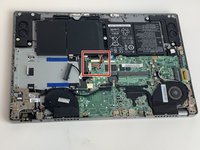
Once the back cover is separated, you’ll see all the internal components of the laptop.
-
-
-
-
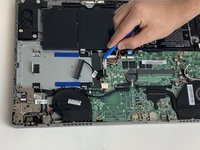
Pull the rainbow cord out by using the iFixit opening tool on each side of its connecting slot.
-
-
-
Remove the M2.5 x 3mm screw that holds down the battery using the Phillips #00 screwdriver.
-
-
-
Lift the battery up from its edges and pull back slightly towards the hinges to remove the battery.
-
-
-
-
-
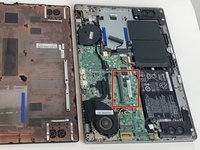
This is where your laptop's RAM memory stick is located in the motherboard.
-
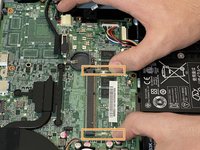
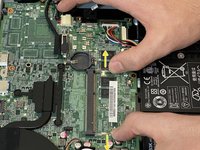
There are two (2) side clips securing the existing RAM memory stick on your laptop.
-
Pull the side clips away from the existing RAM memory stick in the direction marked by the arrows. This will unlock the RAM memory stick.
-
Slide the RAM stick out from the slot.
-
-




To reassemble your device, follow these instructions in reverse order.

Team

Embry-Riddle Aeronautical University, Team S16-G6, Branham Spring 2020 Member of Embry-Riddle Aeronautical University, Team S16-G6, Branham Spring 2020
ERAU-BRANHAM-S20S16G6
5 Members
60 Guides authored
