Free Shipping on Domestic Orders $75+

Acer Aspire E5-573G RAM Replacement

What you need

    1. Acer Aspire E5-573G RAM Replacement, Optical Drive: step 1, image 1 of 1
      • Ensure your device is OFF before beginning this procedure.

      • Unscrew the 5 mm Phillips head screw holding the drive in place.

      Ask FixBot

      Add Comment

    2. Acer Aspire E5-573G RAM Replacement: step 2, image 1 of 1
      • Pull out the disk drive.

      Ask FixBot

      Add Comment

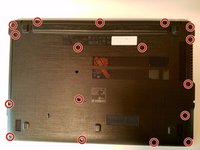
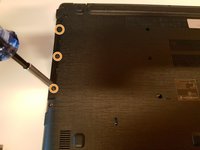
    1. Acer Aspire E5-573G RAM Replacement, RAM: step 3, image 1 of 2 Acer Aspire E5-573G RAM Replacement, RAM: step 3, image 2 of 2
      • Unscrew all 17 (5mm) Philips head screws from the bottom.

      • Unscrew the 3 (2.5mm) Philips head screws underneath the optical drive.

      Ask FixBot

      Add Comment

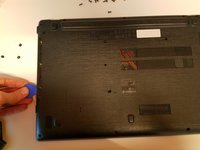
    2. Acer Aspire E5-573G RAM Replacement: step 4, image 1 of 2 Acer Aspire E5-573G RAM Replacement: step 4, image 2 of 2
      • Run a pick around the edge of the laptop (between the two parts) to open it.

      • Lift the left side of the case up and unplug the speaker cable before fully taking the bottom off.

      Ask FixBot

      Add Comment

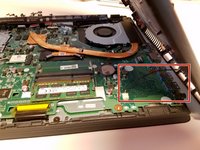
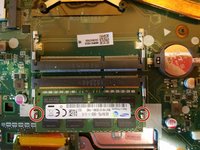
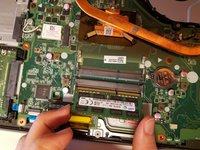
    3. Acer Aspire E5-573G RAM Replacement: step 5, image 1 of 2 Acer Aspire E5-573G RAM Replacement: step 5, image 2 of 2
      • Release the two holding pins.

      • Pull out the ram.

      Ask FixBot

      Add Comment

Conclusion

To reassemble your device, follow these instructions in reverse order.

Cancel: I did not complete this guide.

3 other people completed this guide.

Alex Bahm

Member since: 01/18/18

2,360 Reputation

6 Guides authored

Team

Cal Poly, Team S12-G5, Banghart Winter 2018 Member of Cal Poly, Team S12-G5, Banghart Winter 2018

CPSU-BANGHART-W18S12G5

2 Members

84 Guides authored

0 Guide Comments

Add Comment

View Statistics:

Past 24 Hours: 4

Past 7 Days: 17

Past 30 Days: 49

All Time: 3,973