Free Shipping on Domestic Orders $75+

Acer Aspire E1-571 - Keyboard Replacement

What you need

Video Overview

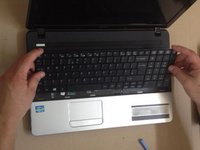
  1. Acer Aspire E1-571 - Keyboard Replacement, Keyboard: step 1, image 1 of 3 Acer Aspire E1-571 - Keyboard Replacement, Keyboard: step 1, image 2 of 3 Acer Aspire E1-571 - Keyboard Replacement, Keyboard: step 1, image 3 of 3
    • Remove the battery.

    • The Keyboard is held by 6x locking clips at up and 2x at both sides.

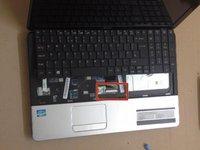
  2. Acer Aspire E1-571 - Keyboard Replacement: step 2, image 1 of 3 Acer Aspire E1-571 - Keyboard Replacement: step 2, image 2 of 3 Acer Aspire E1-571 - Keyboard Replacement: step 2, image 3 of 3
    • Use plastic tool to unlock 6x upper clips.

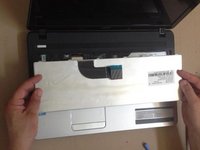
  3. Acer Aspire E1-571 - Keyboard Replacement: step 3, image 1 of 3 Acer Aspire E1-571 - Keyboard Replacement: step 3, image 2 of 3 Acer Aspire E1-571 - Keyboard Replacement: step 3, image 3 of 3
Conclusion

To reassemble your device, follow these instructions in reverse order.

6 other people completed this guide.

ZFix

Member since: 12/09/13

197,027 Reputation

330 Guides authored

Team

Master Techs Member of Master Techs

Community

333 Members

1,477 Guides authored

0 Guide Comments

Add Comment

View Statistics:

Past 24 Hours: 6

Past 7 Days: 20

Past 30 Days: 70

All Time: 12,328