Free Shipping on Domestic Orders $75+

Acer Aspire A315-58 LCD Screen Replacement

What you need

    1. Acer Aspire A315-58 LCD Screen Replacement, LCD Screen: step 1, image 1 of 1
      • Take the screws out and open the lowercase

      Ask FixBot

      Add Comment

    2. Acer Aspire A315-58 LCD Screen Replacement, Battery, LCD cable and Wifi cable removal: step 2, image 1 of 2 Acer Aspire A315-58 LCD Screen Replacement, Battery, LCD cable and Wifi cable removal: step 2, image 2 of 2
      • First, remember to disconnect the battery by sliding the latch towards the battery from the motherboard.

      • Then disconnect the LCD cable (left corner) and the Wifi Cable.

      • Take out four screws at the left and right corners that connect the upper case and LCD part

      Ask FixBot

      Add Comment

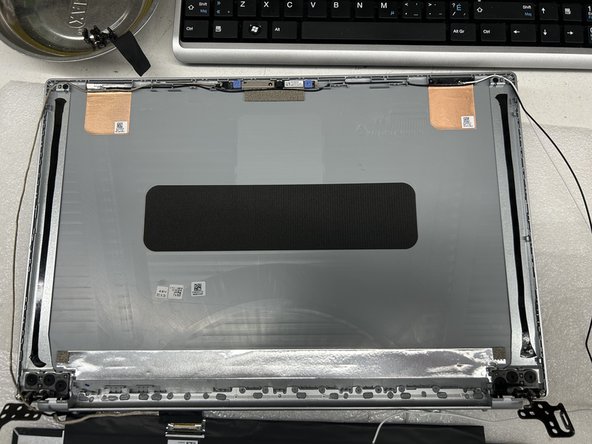
    3. Acer Aspire A315-58 LCD Screen Replacement, Screen replacement: step 3, image 1 of 3 Acer Aspire A315-58 LCD Screen Replacement, Screen replacement: step 3, image 2 of 3 Acer Aspire A315-58 LCD Screen Replacement, Screen replacement: step 3, image 3 of 3
      • Take out the screws and heat up the both edge of the screen where the adhesive tape at.

      • Replace the new tapes shown in the picture on both sides and reassemble the LCD back to the Cover.

      Ask FixBot

      Add Comment

Conclusion

To reassemble your device, follow these instructions in reverse order.

Cancel: I did not complete this guide.

2 other people completed this guide.

Gongmin Zhou

Member since: 06/21/23

129 Reputation

1 Guide authored

0 Guide Comments

Add Comment

View Statistics:

Past 24 Hours: 2

Past 7 Days: 19

Past 30 Days: 70

All Time: 1,733