
Acer Aspire 5741-5698 RAM Replacement

James Smith and 2 other contributors
Last updated on May 31, 2019
Views: 893
View statistics:
- Past 24 Hours:
- 1
- Past 7 Days:
- 17
- Past 30 Days:
- 60
- All Time:
- 893
Comments: 1
1 guide comment.
Go to guide commentsCompleted: 3 4
3 people have marked this guide "completed." Will you be next?
4 people have marked this guide "completed." Including you — great job!
Favorites: 0 1
No one has favorited (and subscribed to) this guide. Will you be the first?
1 person has favorited (and subscribed to) this guide — and that's you!
Introduction
Go to step 1 ↓The Acer Aspire 5741-5698 is an aging laptop that struggles to compete with newer standards. For that reason, replacing the factory RAM chip with something with a bit more power is a good course of action.
What you need
Tools

-
-
-
Flip the laptop over so the bottom side is facing up.
-
Remove the two Phillips screws that secure the bottom flap
 Ask FixBot
-
-
-
-
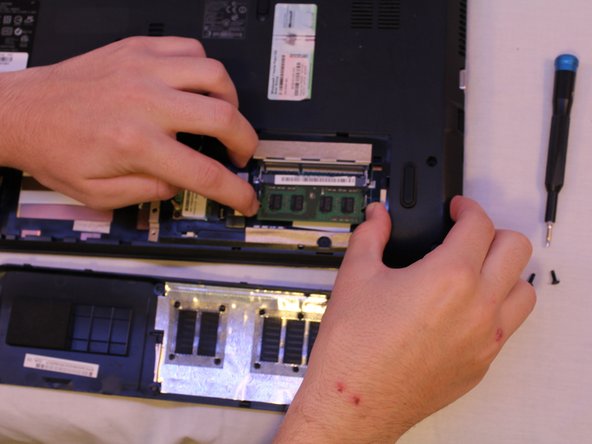
Depress the two prongs holding the chip in and remove the chip.
-
Slide in a new chip, seating it so that it clicks and locks into position.
-
-



To reassemble your device, follow these instructions in reverse order.
Cancel: I did not complete this guide.
3 other people completed this guide.

Team

Cal Poly, Team S18-G6, White Winter 2019 Member of Cal Poly, Team S18-G6, White Winter 2019
CPSU-WHITE-W19S18G6
4 Members
60 Guides authored
1 Guide Comment
No meu caso e ICER aspire 5741 que está com a tela preta e já fiz todos esses procedimentos que vcs mostram, mas não resolveu. Ele liga, pedi a senha, manda aguardar, mas fica com a tela preta. Não aparece nada na tela
